Get ready for rehearsal
Whether you're a worship leader or a team member, you can use Services to streamline your team's rehearsals! This article explains how you can set up plans and use the built-in tools in Services to better prepare for rehearsal.
Want to watch a video before you get started? No problem! This three-minute video will show you the concepts in this article in action.
Set up the plan before rehearsal
Getting your plan ready ahead of time ensures rehearsal runs smoothly. If you're a worship leader or service planner, take the following actions on your plan before rehearsal:
Schedule your team members and notify them. You can send scheduling notifications even before the music is ready to ensure your team members know when they're scheduled.
Add rehearsal times to your plan. Assign each team that needs to attend the rehearsal so they can see the rehearsal time in scheduling emails and reminders.
Set up reminder emails for your team’s rehearsal times and service times, especially if you schedule weeks in advance.
Add songs to the service order so your teams know which songs to rehearse.
Assign song leaders so your team members know which songs they're leading.
Upload files to each song. If you've already uploaded song files (e.g., chord charts, recordings) to your library, make sure to select the right arrangement and key for this plan.
Email your teams once your songs are finalized, or anytime you make an important change they should know about.
Now that you've set up your plan, encourage your team to practice their music using the rehearsal tools in the sections below!
Access tools before and during rehearsal
Depending on whether you're using Services on the web or on the mobile app, you can use different tools to prepare for rehearsal. As long as you're part of a rehearsal team, you can access rehearsal tools on the web by opening a plan's Rehearse tab. If you don't see the Rehearse tab on a plan, you can still access plan files from the Order tab, depending on your file access permissions.
The table below explains the different rehearsal tools you can access from the web compared to the mobile app.
Services | Services Mobile | |
Access media player | ✓ | ✓ |
Download song files | ✓ | ✓ |
Download PDF songbook | ✓ | |
Access Music Stand | ✓ | * |
*Music Stand is a standalone mobile app. Once downloaded, you can also open it from a plan's Files tab in Services Mobile.
Use the media player
The Services Mobile media player lets you play song files while looking at lyrics, chord charts, or plan notes in a single view.
Tip
If your vehicle has an Apple CarPlay or Android Auto compatible display, you can use the Services mobile media player to listen to songs while you drive!
Select the My Schedule page from the bottom navigation in Services Mobile.
Select a plan date for which you've been scheduled.
Select the Order tab at the top of the plan page.
Tap the ▶️ Play button in the top left to open the media player.
Switch between the tabs at the top of the player depending on which song information you want to see:
List: View a playlist of all audio and video files attached to this plan's song items. Tap a file name to start playing it.
To skip a file in the playlist, swipe it to the left until you see Skip. The song will bounce back into place, and the file icon will be grayed out, removing it from your playlist.
Services remembers your skipped files when you return to the playlist on either the web or mobile media player.
To add a file back to your playlist, swipe left on it again until you see Play.
Song: View the current song's cover art and song details.
Lyrics: View lyrics that have been added to the current song using the Lyrics & Chords editor.
Docs: Open the current song's attached files, such as lyric PDFs, chord charts, or any other documents.
Notes: View notes that have been added to the current playing song item.
Use the media controls at the bottom of the player to pause, play, and move between songs on the playlist.
To loop a section of audio, tap the 🔁 loop icon next to the song's timeline on the media player, then drag the handles to the section of the song you'd like to loop.
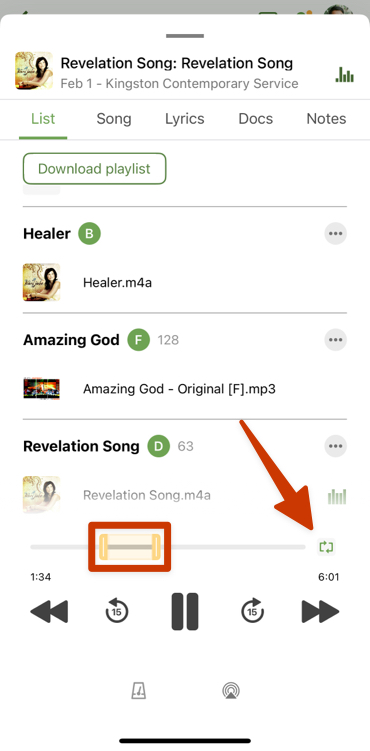
When you enable looping for that song in the future, the app remembers your custom looping positions. Depending on your device, looping may not be supported while your screen is locked or when you leave the app.
(Optional) Tap the metronome icon at the bottom of the player to open the built-in metronome.
Swipe down on the media player to exit.
If you exit the player while an audio file is still playing, the mini player appears at the bottom of the page.
Tap the mini player to open the full-screen media player.
Swipe across the song's progress bar to skip forward or backward through the track.
To close the mini player, swipe left on the mini player and tap the red X that appears.
Important
The media player shows audio files and links to YouTube and Vimeo, but third-party links to Spotify and Apple Music are not included.
Download song files for practice
Download a PDF songbook
If you're on the web and prefer printed chord charts or lyrics, you can download a PDF of selected plan files, called a songbook.
Important
If your church uses limited file visibility, your songbook will include only the files available to you.
Select the My Schedule page in the top navigation.
Select a plan date for which you've been scheduled.
Select the Rehearse tab.
Select the Songbook button at the top right.
Check the boxes next to the file types you want to include in the songbook. If your church has limited file access enabled, the file type options depend on which tag groups are available for your position.
Select Accept to download the Songbook PDF.
Tip
If you edit the PLAN: Songbook Cover Sheet report option on the custom reports page, your custom cover page will be automatically applied if you check the Order of Service box in the songbook options popup.