See how Check-Ins works
Before you use Check-Ins at a service or event, follow the steps below to see how Check-Ins works for you in your setting!
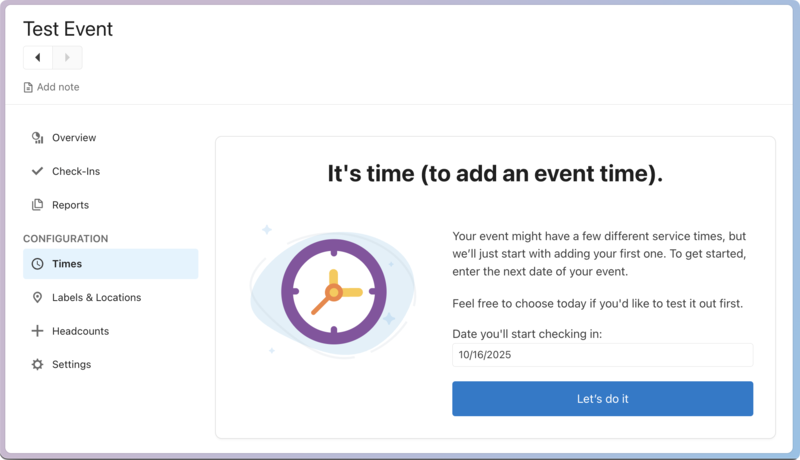
1. Create a time
Create a new session by adding a time to your current event.
Tip
If you're using the Services integration and want to test volunteer check-ins, make sure the day and time of your test session match the day and time your volunteers are scheduled for in Services.
If your event requires people to register, you can create the event through Registrations, and then Start a New Session from the Check-Ins Event Settings to test out your stations.
2. Set up physical stations
Every church has a different setup.
Some have self stations, where families scan a code or enter their phone number.
Some have manned stations, where a volunteer helps people get checked in.
Some handle all the check-in in classrooms at roster stations. Others require labels for people to attend certain classrooms.
Try out different setups in your location with the supplies you have.
Station setup
Your physical setup will determine which stations you use, so power on the devices you'll be using for your service or event, and put them in their physical locations. From the Check-Ins app, decide if your station needs to be manned, roster, or self.
Tip
Once you have all the stations the way you want them, create a template with them, so they automatically go to that setting at the allocated time!
Printers and labels and scanners, oh my!
If you're printing labels, set up your printers with the device they're associated with. Make sure they have labels in them!
If you want people to scan barcodes, mobile passes, or the Church Center mobile app to check in, verify your scanners are working.
Scanners can be attached to any Mac/PC, but Android or iOS apps use the device camera.
3. Check people in
Once your Check-Ins app is running, and the scanner, printer, and labels are ready, check people in at each station. Check in adults, children, and volunteers, paying attention to the location filters you've set up.
Use a variety of ways to check people in:
Church Center app with Allow Complete (no label will print).
Church Center app without Allow Complete (label will print).
Phone number
Search on manned station
Barcode
Mobile pass
After you're finished testing, you can delete the session from the event settings and start a new one when you're ready for the real thing!