Manage your schedule
From the My Schedule page in Services, you can respond to scheduling requests, sign up for plans, and set blockout dates. If you have a household set up in People, you can also manage your household members' schedules!
Tip
You can also respond to scheduling requests from the Me page in Church Center.
Want to watch a video before you get started? No problem! This four-minute video covers the My Schedule page and household scheduling.
My Schedule page overview
View and manage your scheduled plans, block out dates, contact your team leader, and sign up for plans where signup sheets have been enabled.
Tip
If a team leader has added you to their schedule but hasn't sent you an email, it will not show up in My Schedule until the email is sent.
Sign up for a position
If signup sheets are available for your team, you can sign up for the position and date that works best for you.
Respond to requests
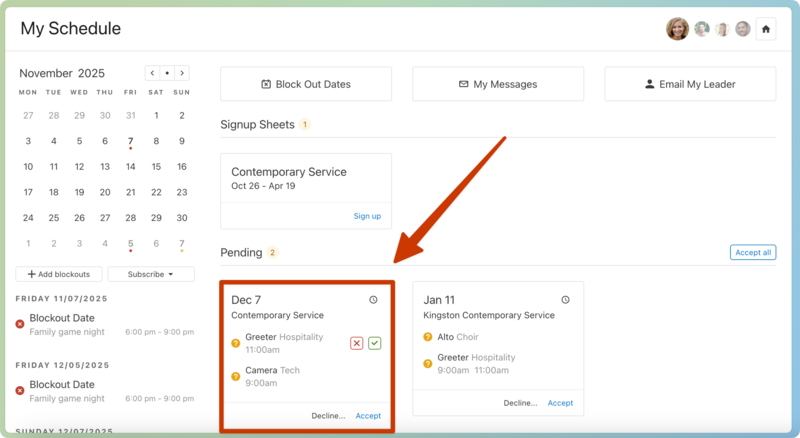
You can respond to scheduling requests in the Pending section of your My Schedule page.
Select the My Schedule page from the top navigation in Services.
Scroll down to the Pending section to view the plans for which you've been requested.
Select a date to go to the corresponding plan page.
Select the clock icon in the top right of a request to view the times for which you've been requested.
Respond to requests for each plan using one of the following options:
If you've been requested for a single position: Hover over the position and select the red X or the check mark icon to decline or accept the request.
If you've been requested for multiple times on a split team: Hover over the position and select the Respond button that appears. In the popup, choose separate responses for each requested service time, then select Submit.
If you've been requested for multiple positions: Select Decline all or Accept pending in the bottom right of the request to decline or accept all requested positions in that plan.
Tip
If volunteer replacements are enabled for your team, you can select a replacement when declining a request.
(Optional) Select Accept all in the top right of the Pending section to accept all pending requests.
Select the Schedule page from the bottom navigation in Services Mobile.
Scroll down to the Pending section to view the plans for which you've been requested.
Tap a date to go to the corresponding plan page.
Tap the clock icon in the top right of a request to view the times for which you've been requested.
Use the buttons at the bottom of each plan request to choose your response:
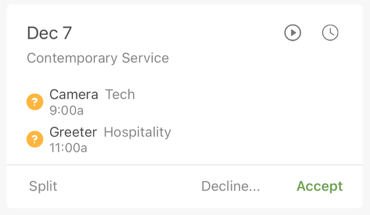
Tap Decline... or Accept in the bottom right to decline or accept all requested positions on this plan.
If you've been requested for multiple positions: Tap Split in the bottom left to show separate Decline... and Accept buttons for each individual request.
If you've been requested for multiple times on a split team: Tap the position and select the Accept or Decline button that appears. Choose separate responses for each service time on the next page, then tap Submit in the top right.
Tip
If volunteer replacements are enabled for your team, you can select a replacement when declining a request.
(Optional) Tap Accept All in the top right of the Pending section to accept all pending requests.
Select a replacement
If your team leader has enabled the volunteer replacement setting for your team, you can choose an available team member to replace you when declining a request. You can select a replacement when declining a single request or multiple requests at once.
Warning
You must confirm that this team member can cover the request before choosing them as your replacement in Services. Choosing a replacement automatically confirms them for the plan, so make sure to coordinate with them before declining.
For a single request
For multiple requests
Change your response
If you have accepted a position and decide later that you want to decline it, you can decline it from the Confirmed section of your My Schedule page. You can only change your own responses, not your household members' responses.
Important
If you want to accept a previously declined position, you must request that your team leader reassign you. Contact them using the Email My Leader button at the top of your My Schedule page.