Introduction for staff members
You have access to a database full of people who attend your church! Use it to connect more easily with people and to continue following up with them.
Profile
On a person's profile, you can see their contact information, household, and social profiles or school information.
From the Activity tab, you can see the last time a person checked in, attended a group, served on a team, or registered for an event. You can see activity for the products for which you have permissions.
Select the product name to view or remove that product from the list.
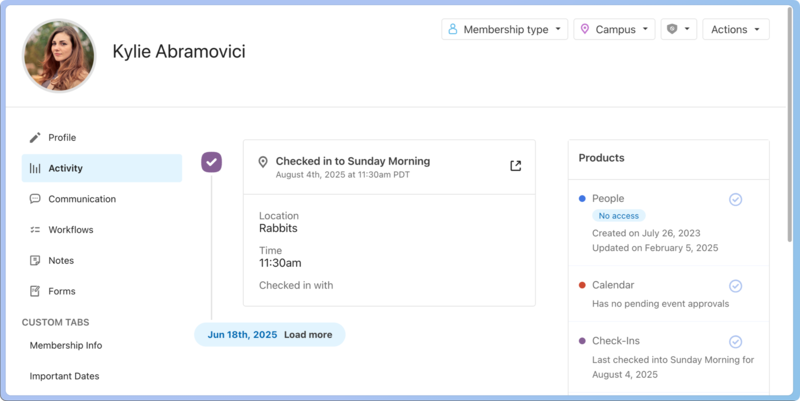
You can view any notes left on their profile in the Notes tab. If you have editor permissions, you can also add notes.
Lists
If you need to contact groups of people, you can create a list and then use bulk actions or automations to reach out to them.
Check out some common lists to see some ideas of how to use this feature.
Workflows
Workflows help you move people through a process. You might already be assigned to some cards, so make sure you keep up to date with the workflows by checking the tab or updating your notifications.
Important
If you have permission, you can also create workflows.
Notifications
Everyone who can log into Planning Center can view their notifications across all Planning Center products by selecting the 🔔 bell icon in the toolbar. Selecting a notification takes you to that product. Or, if you select the three-dot button next to the notification, you can either mark it as read or add it as a task in your To do list. You can filter your notifications by selecting Show read or Hide read at the top of the toolbar.
Get help and support
Any time you have questions, Planning Center's support team is here to help! Use the ? question mark icon in the toolbar to open the Help and support sidebar.
From here you can:
Search online documentation for an instant answer to your question. The toolbar also suggests help articles based on the page you are currently viewing.
Access getting started resources or jump into Planning Center University (PCU). You can also connect with other Planning Center customers in the customer communities and see what's new by checking out the changelog.
Connect with a support agent for one-on-one help. You can email them directly from the toolbar, or schedule a phone call if you prefer.
Depending on which Planning Center product you're using, you can also contact support directly from the corresponding mobile app:
Services/People: Tap your profile icon in the top right, then tap Help to access help articles or open a ticket with support.
Check-Ins: Tap the ⚙️ settings icon in the bottom right, then tap Contact Support to open a ticket with support.
Music Stand: Tap the menu icon (three horizontal lines) in the top left, then tap Help to access help articles or open a ticket with support.
Organization administrator requests
The following Support requests can only be made by organization administrators:
Data removal or corrections you can't make yourself (undo old CSV imports, iCal imports, etc)
Gain access to anything that was created and managed by someone else in the account
Restore or fully delete a canceled account
Request access to Giving (if there are currently no Giving administrators in the account)