What is Services LIVE?
Services LIVE helps you go through the order of service in real-time, allowing you to communicate with your teams, keep everyone on track, and plan better for the future. Team members can access LIVE from their scheduled plans if they want to follow along. Choose from several different formats to display on monitors around your church, such as a stage display or a production booth.
Who can use LIVE?
Administrator | Editor | Scheduler | Viewer | Scheduled viewer | |
|---|---|---|---|---|---|
Control LIVE | ✓ | ✓ | * | * | * |
Access chat | ✓ | ✓ | ✓ | ✓ | |
View LIVE | ✓ | ✓ | ✓ | ✓ | ✓ |
✓ Available by default
* Available depending on settings
Those who cannot control LIVE will only see the button once a controller has started the session. They do not have access if no one is controlling it.
Open Services LIVE
You can open Services LIVE from a plan page.
Select Plans from the top navigation.
If you have multiple folders, select the folder where your service type belongs.
Scroll down to the service type you're working with and select a plan date.
Select the Order tab at the top of the plan page.
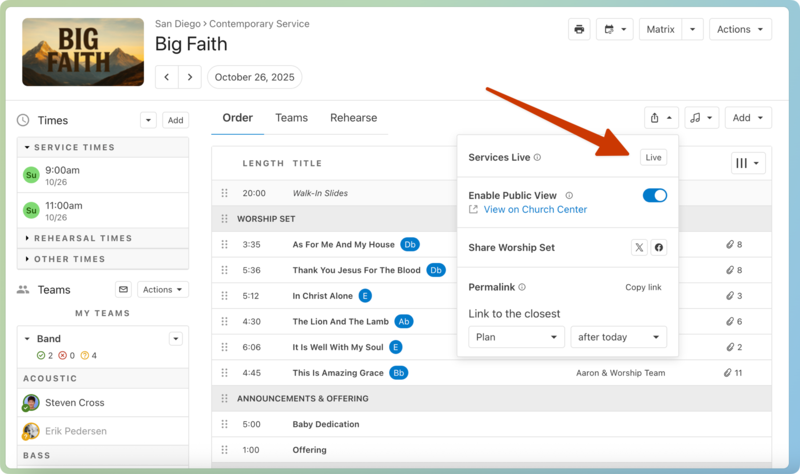
Select the Share icon in the top right of your service order.
Select the Live button. If you don't see the Live button, you'll need someone with LIVE control permissions to start the session first.
If you have permission to control LIVE, you can start a session from a plan page:
Select Plans from the bottom navigation.
If you have multiple folders, select the folder where your service type belongs.
Select the service type you're working with.
Tap on a plan date to open that plan page.
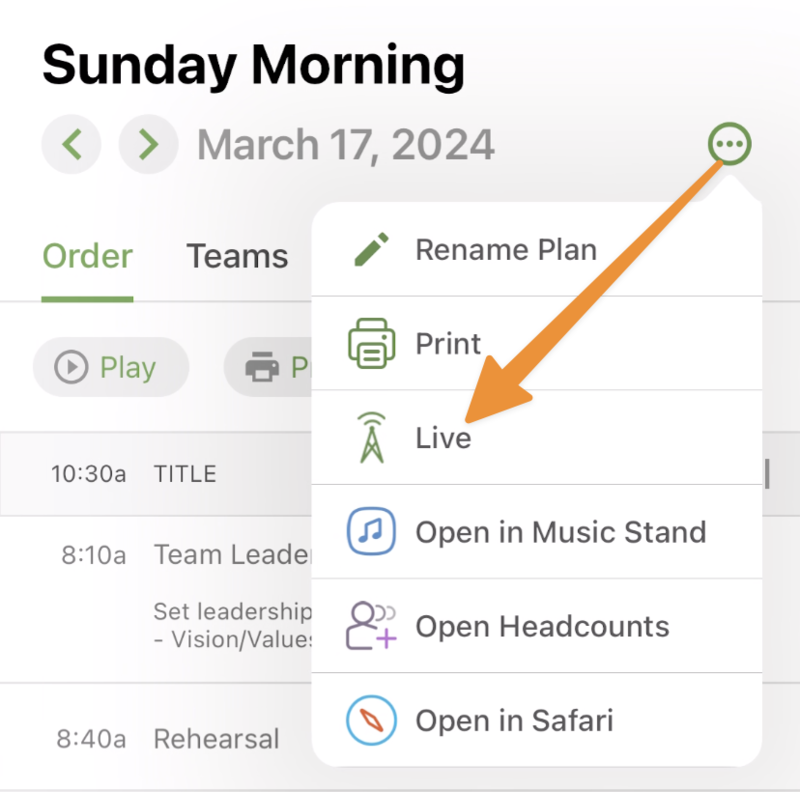
Tap the three-dot icon in the top right of the page.
Tap Live from the dropdown.
If you have scheduled viewer or viewer permissions, you can only open a LIVE session once a controller has started the session.
Select a plan from the Plans tab or the My Schedule tab.
Select the Order tab on the plan page.
Select the Live button above the order of service. If you don't see this button, you'll need someone with LIVE control permissions to start the session first.
If you have notifications enabled for the Services app on your device:
You'll receive push notifications about LIVE if you leave the app or if your screen is locked.
If you close LIVE in the app to view something else in Services, you will not receive notifications.
Important
If the service order changes while someone is running LIVE, they will only see the change if they manually refresh.
What does LIVE show?
Services LIVE has a control and display. Your volunteers can chat and see the order of service details on the control format, and others around your church can see the current and upcoming items from other displays.
The Normal Layout is great for your production booth or anyone calling cues, as it provides various details about what's happening now and coming up. It's also the only view where chat is visible.
Here's an overview of what the Normal Layout displays:
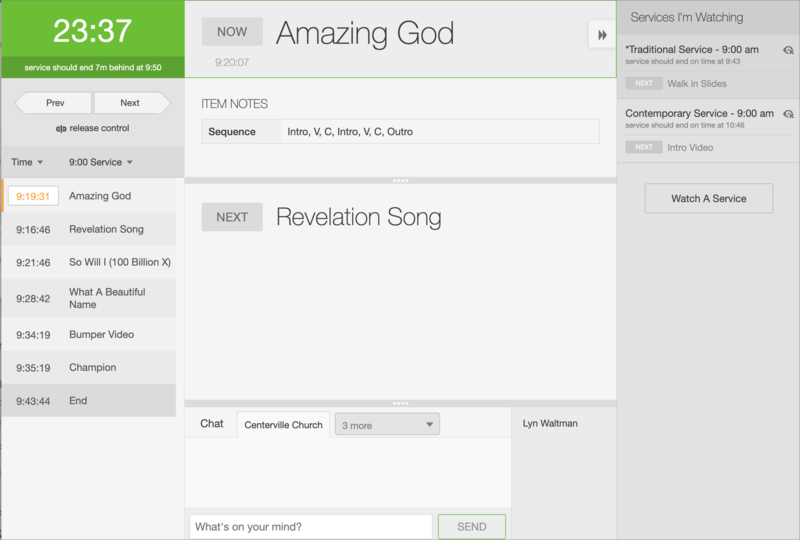
Countdown: Check the countdown clock in the top left to see how much time is left for your current plan item. Change how much time the countdown clock displays by hovering over the top and selecting a Countdown setting from the dropdown:
Full Item Length: Display the full item length for each plan item. For example, if you want your guest speaker to have their full 20 minutes, even if that makes the service run long .
End Item on Time: When you're trying to stay in sync with other services happening simultaneously, like if you need to start a video at the same time.
End Service on Time: If you have multiple service times, your service needs to end at a certain time to turn over the parking lot.
Control: If you have the right permissions, you can control the order of service and move through each plan item in real time! Select take control to take control of the LIVE session.
Select the Start arrow below the countdown clock to start the first plan item.
Use the Prev and Next arrow buttons to cycle through plan items. (Or use keyboard shortcuts for extra speediness!) The items in the Now and Next sections of the screen will change on your main screen and update any other screens watching LIVE.
Service order: View the complete service order from the left sidebar. Select a plan item to see more details, such as item notes and planned lengths.
Select the Time dropdown to toggle between viewing the Length, Planned Time, or Projected Time for each item.
If you have multiple service times, select a time from the [Time] Service dropdown to view items from that service time.
Times in yellow are recorded times; times in black are projected times. These numbers update as you move through your order.
Now/Next: As you cycle through your service order, you'll see the current plan item's name and item notes in the Now section. Preview your next plan item's name and notes in the Next section.
Chat: Chat with your team members in real time about the service you're running. Check out the Services LIVE chat section to learn more about this feature!
Services I'm Watching: Select the eye icon at the top right of the page to expand the Services I'm Watching sidebar. This sidebar allows you to keep tabs on other services happening at the same time.
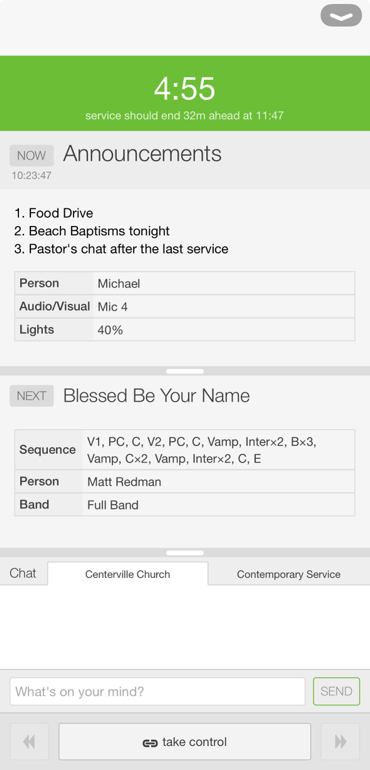
Tap the arrow in the top right to expand the top menu. Select a different Layout, Countdown setting, or tap the moon icon to enable dark mode.
Countdown: Check the countdown clock at the top to see how much time is left for your current plan item. Change how much time the countdown clock displays by tapping Countdown from the top menu and choosing a setting:
Full Item Length: This setting displays the full item length for each plan item. For example, if you want your guest speaker to have their full 20 minutes, even if that makes the service run long .
End Item on Time: Use this setting when you're trying to stay in sync with other services happening simultaneously, like if you need to start a video at the same time.
End Service on Time: Choose this setting if you have multiple service times, your service needs to end at a certain time to turn over the parking lot.
Now/Next: As you cycle through your service order, you'll see the current plan item's name and item notes in the Now section. Preview your next plan item's name and notes in the Next section. Drag the bars above each section to resize them and display more information.
Chat: Chat with your team members in real time about the service you're running. Check out the Services LIVE chat section to learn more about this feature!
Control: If you have the right permissions, you can control of the order of service and move through each plan item in real time! Select take control to take control of the LIVE session.
Select take control to start controlling the LIVE session.
Tap the left and right arrow buttons to cycle through plan items. The items in the Now and Next sections of the screen will change on your main screen and update any other screens watching LIVE.
Services LIVE chat
Important
Only people with viewer permissions or higher can see the LIVE chat.
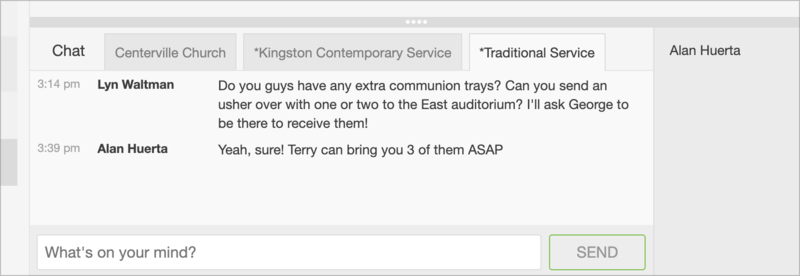
Services LIVE chat is an excellent tool for sending real-time messages to your team about an ongoing service!
If you watch multiple services simultaneously, each service shows in a new tab. Different chat tabs have different audiences, so select a chat tab based on who you need to message:
Organization-level chat: Select the tab with your organization's name to message everyone watching a LIVE session. This tab is visible for anyone with chat access, regardless of which service type they're viewing.
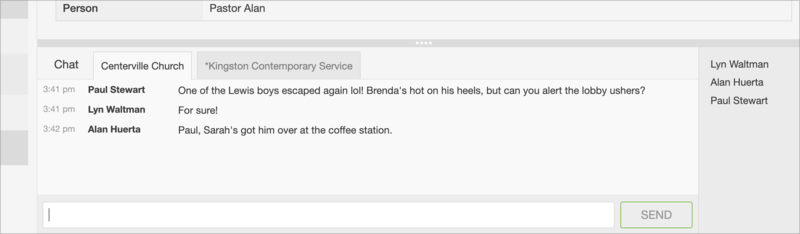
Service type chats: Select a service type tab to chat with those viewing a LIVE session in a specific service type. Use these tabs when you only need to communicate with people from a particular service.