Manage your announcements page
The announcements page is a custom page in Publishing that lets you create a centralized list of what's happening at your church—events, volunteer opportunities, and anything else you want to share with your congregation. You can think of it as a digital bulletin!
Subscribe to the Plus or Premium Publishing plan to create custom pages.
Tip
Posting an announcement does not notify your congregants. If you want them to receive a notification, send a message through the Church Center app.
You'll start by adding a new announcement. Once you've done that, you can add the announcements page to your Church Center navigation. Let's get started!
Add an announcement
Select the Content page from the top navigation in Publishing.
Select the Announcements tab.
Select Add announcement.
You can start from a blank slate and enter your announcement information by hand, or choose to pre-fill from existing content. Select and search for a Sermon, Group, Signup, or Event to automatically populate the title, summary, image, and link. Everything remains editable after importing.
Select Create at the bottom of the Add announcement pop-up.
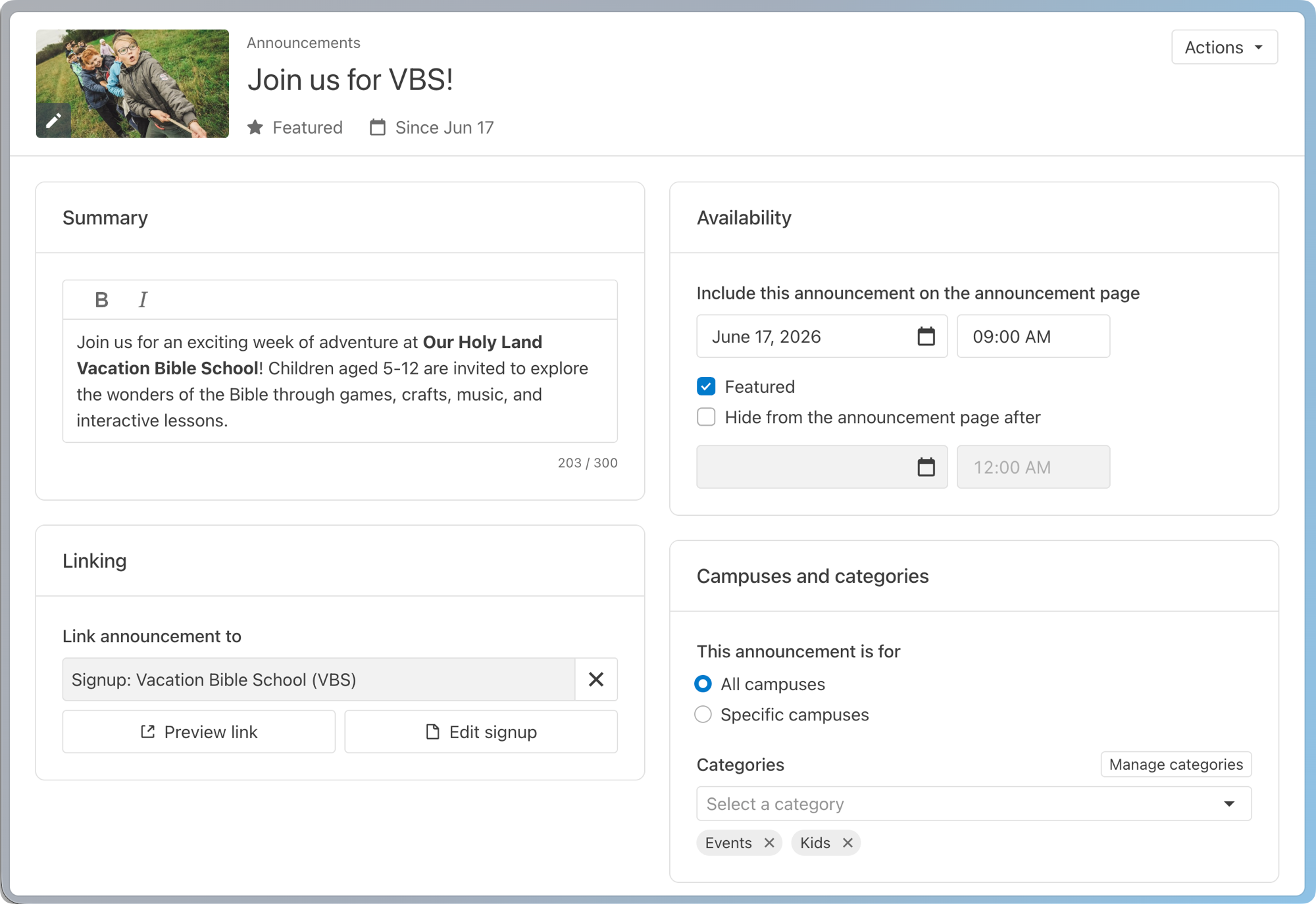
Add an image by selecting the ✏️ edit icon on the current image placeholder. Refer to the image sizing guide for size and file type requirements.
Summary: Add a short summary that will appear on the main announcements page.
Linking: Add a link to a Church Center page or external URL. This link is where congregants will be taken when they click or tap your announcement.
Visibility: Choose when to show and hide the announcement, and whether to highlight it as a featured announcement.
Campus and categories: Choose which campuses to show this announcement to, and which categories the announcement belongs in.
Now you're ready to add your announcements page to your Church Center navigation!
Manage and edit announcements
From the Announcements tab, you have several options for managing announcements.
Use the filter dropdown and 🔍 search bar at the top of the list to find and view announcements. Select an announcement to edit it.
Select Manage announcements page to preview your announcements page, change the layout, and view analytics.
Select Add announcement to create a new announcement.
Examples of common announcements
Announcement type | Details |
Order of service | Tell people what to expect during your upcoming services. |
Connection card | Gather information from congregants by linking to a People form. |
Events | Link to signups for upcoming events. |
Meet the team | Introduce your leadership team or new staff members. |
Offering | Link to your Giving page so people can easily donate to a specific fund. |