Track RSVPs
Keep track of RSVPs so you're always ready with the right food, games, and resources for your group events! If an event is set up to ask for RSVPs, members can RSVP from the reminder email or in Church Center.
Important
Only administrators and group type managers can view and edit RSVPs on the group's event page in Groups. Group leaders can manage RSVPs for their events in Church Center.
Manage RSVP settings for your events
You can choose whether to ask for RSVPs when creating a new event. If you want all of your events to ask for RSVPs, you can adjust the default RSVP setting for an individual group or for the entire group type.
View an event's RSVPs
Select the Groups page from the top navigation in Groups.
Select a group from the list.
Select the Events tab from the left sidebar.
Preview an event's RSVP numbers in the RSVPs column.
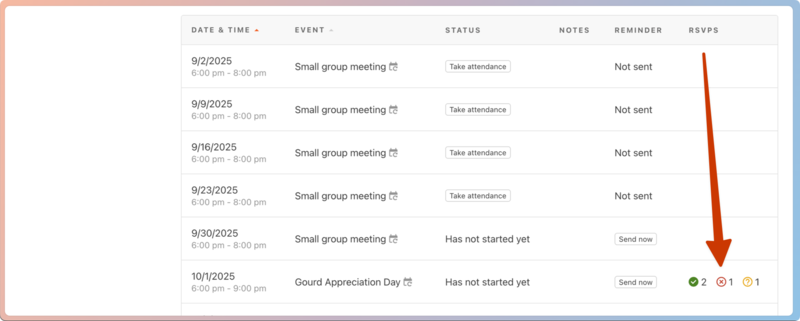
Select an event name from the list to open it.
Scroll down to the event's RSVPs section to view individual members' responses:
Use the All members dropdown at the top of the list to filter for people with a specific RSVP status.
Select the 🖨️ print icon to print the event information, RSVP summary, and members list.
Edit an event's RSVPs
If members need to change their RSVPs for an upcoming event, you can edit their responses individually.
Select the Groups page from the top navigation in Groups.
Select a group from the list.
Select the Events tab from the left sidebar.
Select the event you'd like to edit.
Scroll down to the RSVPs section to view individual members' responses.
Select Edit next to the RSVP you'd like to edit.
Select a new response from the Response dropdown.
(Optional) If you select Yes or Maybe and the event allows attendees to add guests, you can choose how many guests to add to the RSVP.
Select Save & send to save the new response and email the member that their RSVP has changed. Members can update their RSVP again from the email.