Connect with your group
Your Church Center group page is the hub for chat, resources, member info, and events. Here, you can view the next meeting, share a prayer request, or download the most recent discussion notes. Your group leader has organized this hub to help you connect with your group!
Important
If a group page states that members are confidential, features like chat and contacting other members are not available for privacy reasons.
Member info in confidential groups is not visible to other group members. However, member names are visible to leaders and anyone with Groups or Planning Center administrator permissions.
Using the Church Center mobile app, you are automatically directed to the dashboard when you select your group.
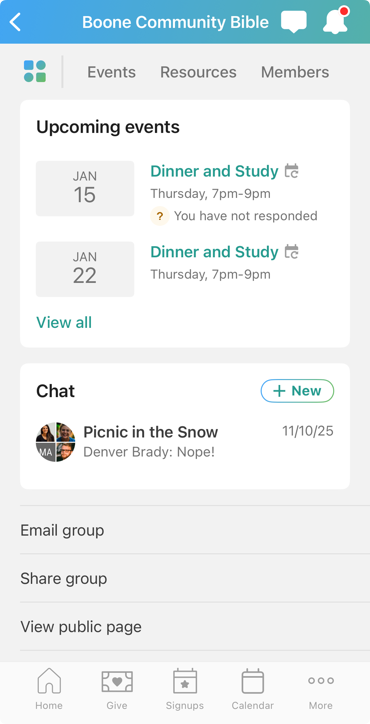
Tap the 💬 chat icon from any page in Church Center to access your group's chats.
Use the tabs in the header to view your group's events, resources, and members , or tap the dashboard icon to return to the dashboard.
View the upcoming events for your group. Tap View all to go to the Events tab, where you can view all events and subscribe to the group calendar.
Start new chats by tapping New (if enabled), view recent conversations at a glance, or tap View all to go to the group chat view, where you can see all your conversations for just that single group.
At the bottom of your dashboard, you can email your group, share your group, view the public (non-member) page, manage notifications for this group, subscribe to a daily email digest of the group chat, or leave the group.
Using Church Center on a web browser, your group's page defaults to the Events tab. From this landing page, use the Actions dropdown to send an email, view the public (non-member) page for your group, go back to the Groups administrator pages, or leave the group.
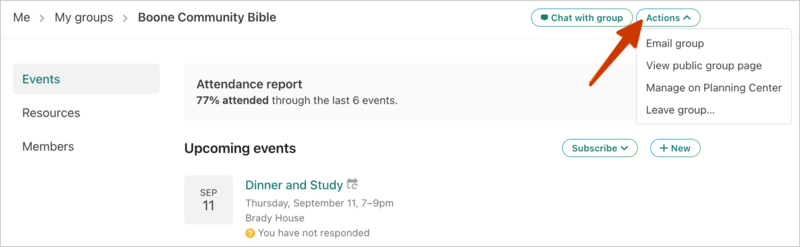
View and RSVP for events
On the Events tab, you can view upcoming group event details, such as dates, times, and locations. Events with the Shared event badge are either church-wide events or involve multiple groups from your church.
If RSVPs are enabled for an event, select the Respond button and choose your response from the dropdown. Your options are I'll be there, I can't make it, or I'm not sure. You can update your response later if your plans change.
Download group resources
On the Resources tab, select a resource to view its description. From the resource's page, select View resource to open the file/link.
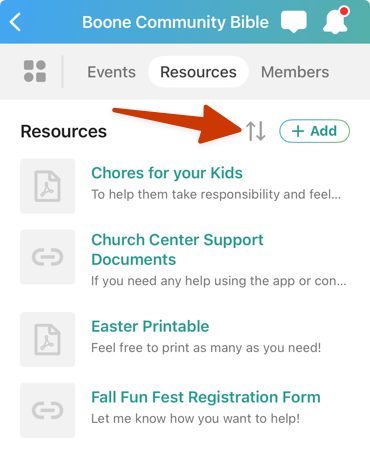
You can sort items on the Resources tab by selecting the sort arrow icon at the top and choosing Name or Last Updated.
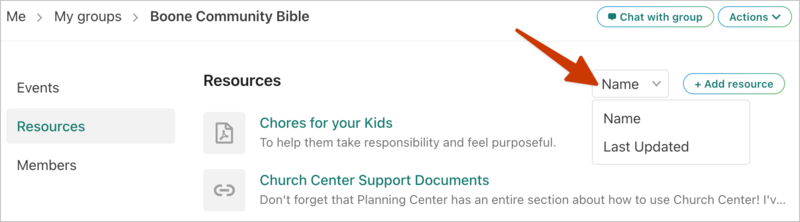
You can sort items on the Resources tab by selecting the Name button and choosing Name or Last Updated from the dropdown.
Contact other members
Group members are listed on the Members tab, unless a group administrator or group type manager has set the group to confidential.
If a member has made their contact information visible, you can view it by selecting Member info underneath their name.