Create and manage events
Whether it's a weekly virtual meeting or an annual in-person celebration, events allow your groups to connect, and that's what it's all about! As a leader, you can organize, edit, and share events for your group, including managing past event attendance and enabling RSVPs to track responses for upcoming events.
Tip
Members can subscribe to the group calendar to add these events to their calendars.
Create a new event
Select your profile picture or initials at the top of the app.
Scroll down and select your group under the Activity & involvement section.
Select the Events tab.
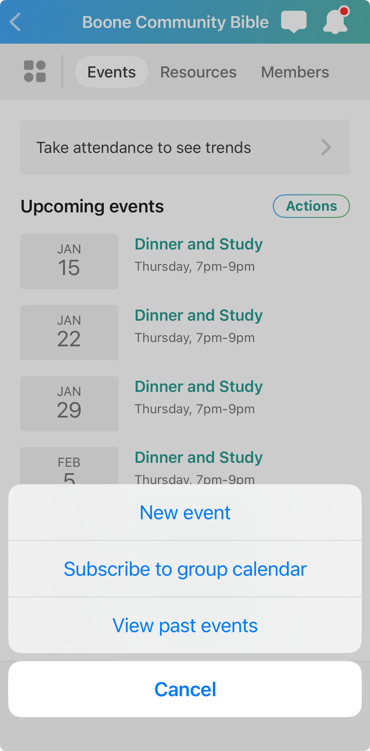
Select the Actions button in the top right.
Select New event to create a new event and add the name, dates/times, frequency, location, and description. Uncheck Ask for RSVPs if you don't need to track responses.
Tip
Select Subscribe to group calendar to add your group's events to your personal calendar or select View past events to view or edit notes and update the location, description, or attendance for a past event.
Select your profile picture or initials at the top of the page.
Scroll down and select your group under the Activity & involvement section.
Select the Events tab.
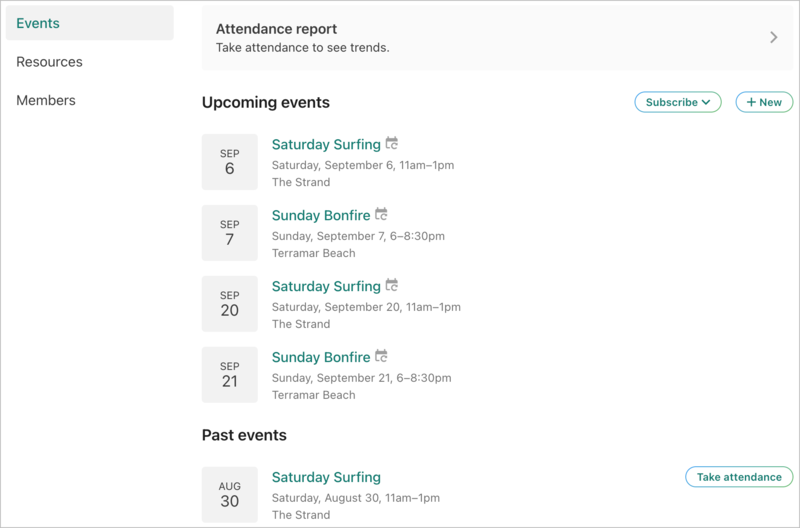
Select New to create a new event and add the name, dates/times, frequency, location, and description. Uncheck Ask for RSVPs if you don't need to track responses.
 |
Tip
Select Subscribe to add your group's events to your personal calendar. Scroll down to the Past events section to view or edit notes and update the location, description, or attendance for a past event.
Edit and share an event
Go to a specific event to make changes or share it. Events with the Shared event badge were promoted from the church calendar and can't be edited.
If you want to share the event with your church administrators so they can add it to the church calendar, ask them to send you an event request form!
Scroll to the bottom of an event's page.
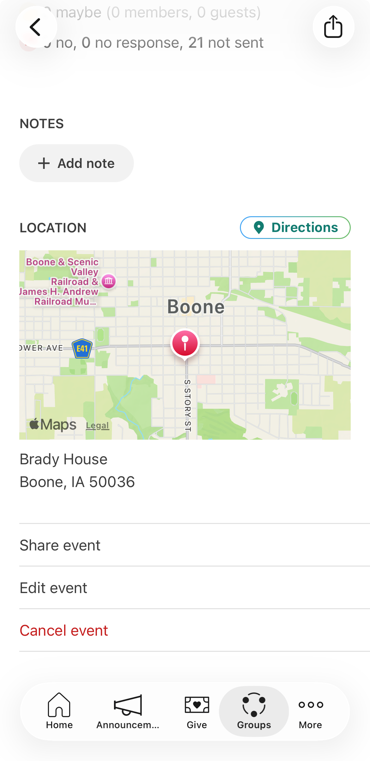
Share event: Use your device's sharing options to send the Church Center link to this event.
Edit event:
When editing a repeating event, you can update the single event or all future events.
You can switch to a different shared location or make your event virtual; however, any new locations must be added from the Groups administrator pages.
Cancel event: Canceling is the best option when your group intended to meet but didn't. Make sure to leave a note explaining the reason for cancellation. If you change your mind and decide to meet, use the same menu and select Restore event.
You can edit or cancel an event that already exists from the Options menu on the event's page.
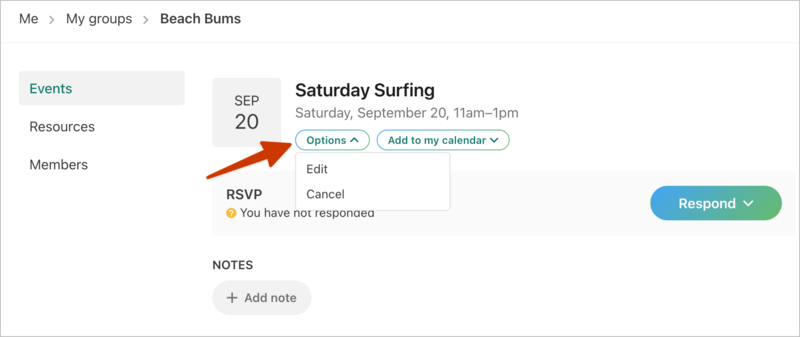
Edit: When editing a repeating event, update the single event or all future events. Please note:
When editing an event, you can switch to a different shared location or make your event virtual; however, any new locations must be added from the Groups admin pages.
Cancel: Canceling is the best option when your group intended to meet but didn't. Make sure to leave a note explaining the reason for cancellation. If you change your mind and decide to meet, use the same menu and select Restore event.
Manage RSVPs
If RSVPs are enabled, you can see or edit a response when your group members respond to events.