Services LIVE mobile
Services LIVE allows you to step through your plan in real time to keep track of timing, see your item notes during the service, and stay in sync. You can use LIVE from Services web or the mobile app.
Important
Only editors and administrators can control LIVE by default, but other people can be given control from the service type's settings. Viewers and higher permissions can use chat.
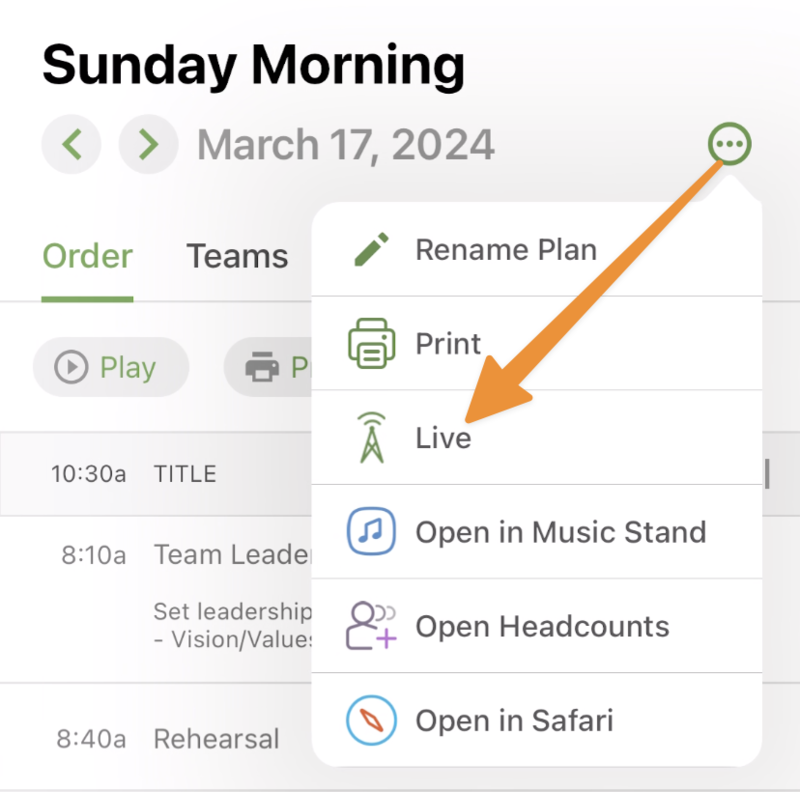
Launch Services LIVE from a plan by tapping LIVE from the plans menu.
 |
If you have notifications enabled for the Services app on your device:
You'll receive push notifications about LIVE if you leave the app or if your screen is locked.
If you close LIVE in the app to view something else in Services, you will not receive notifications.
See the Update Services LIVE displays and What is Services LIVE? articles for more information.