Archive and restore songs and arrangements
If you have songs or arrangements you've used but no longer plan to use, you can archive them instead of deleting them! It's recommended not to delete songs or arrangements unless you're sure you won't want to use them again.
People whose Song permissions are set to editor or above can archive and restore songs and arrangements.
Important
Files previously uploaded to a song or arrangement will continue to take up storage space in your account even after archiving. Delete unused individual files from your Files page to free up storage.
You can archive or restore a single song/arrangement or multiple at once!
Archive a single song or arrangement
Select the Songs page in the top navigation.
Select a song from the list.
To archive the entire song, select Actions in the top right and choose Archive song from the dropdown.
To archive a specific arrangement for this song, select an arrangement from the left sidebar and select the Archive button in the top right of the arrangement information.
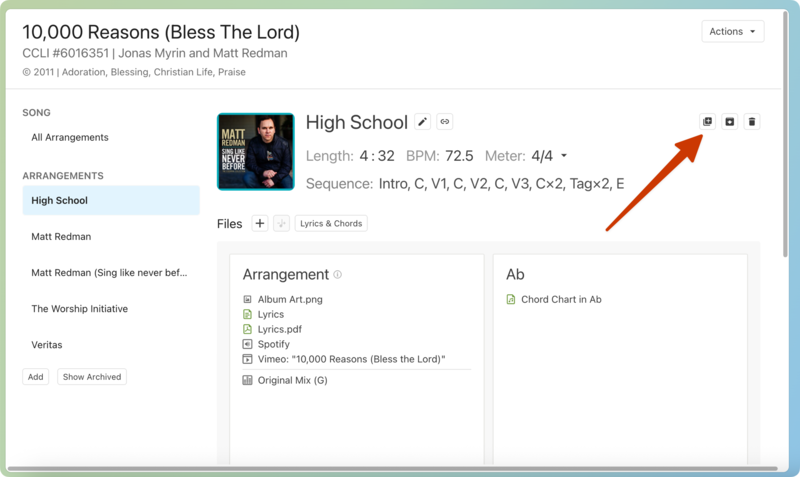
Restore a single song or arrangement
To restore a single song or arrangement, you must first adjust your filters to view archived songs and/or arrangements. Here's how:
Select the Songs page in the top navigation.
Select Filter in the top left to expand the filter menu.
Select the History tab.
Select Show Archived Songs and/or Show Archived Arrangements.
Type a specific song or arrangement's title in the search input field to Add a text filter for that title.
To restore an archived song, select an archive song title from the list. Select Actions in the top right and choose Restore song from the dropdown.
To restore an archived arrangement, select the dropdown next to a song title to view a list of archived arrangements. Select the arrangement title, and then select Restore in the top right.
Archive multiple songs or arrangements
Select the Songs page in the top navigation.
Select the ✏️ edit icon at the top of the list.
Select either Bulk Edit Songs or Bulk Edit Arrangements.
Select the checkboxes next to the songs or arrangements you want to archive.
Select the Bulk Edit button at the top of the list.
Select Archive from the dropdown.
Select Update X Songs or Arrangements to finish the process.
Tip
Before archiving songs, you can create a filtered list with the songs you want to archive together.
For example, you can create a filtered list of Christmas songs before archiving them. When you're beginning to plan your Christmas services again, you can find and restore those songs by filtering the Songs page for archived songs with the "Christmas" tag.
Restore multiple songs or arrangements
To restore multiple songs/arrangements, you must adjust your filters to view archived songs and/or arrangements first. Here's how:
Select the Songs page in the top navigation.
Select Filter in the top left to expand the filter menu.
Select the History tab.
Select Show Archived Songs and/or Show Archived Arrangements.
Select the ✏️ edit icon at the top of the list.
Select either Bulk Edit Songs or Bulk Edit Arrangements.
Select the checkboxes next to the songs or arrangements you want to archive.
Select the Bulk Edit button at the top of the list.
Select Restore from the dropdown.
Select Update X Songs or Arrangements to finish the process.