Create timecard reports
If you need to know how much time team members are serving, you can get this information by running a matrix timecard report. You might want to track this information for payroll, community service hours, or volunteer appreciation.
What's in a timecard report?
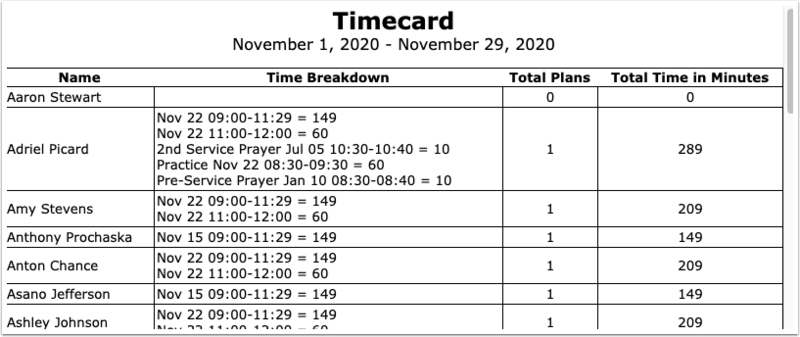
A timecard report includes the following information for the time period you choose:
Each service time the person is assigned to in a plan.
The start and end times, as well as the total time for that service.
The number of plans and the total time the person served.
Setting up times
The more accurate the time in your plans and team assignments are, the more accurate this report will be.
Before running a time report, make sure that:
Times are accurate for each plan.
People are assigned to the correct times.
Creating a timecard report
Set up the matrix for the weeks that you want to track.
Select the 🖨️ print icon in the top right.
Select Timecard from the Report dropdown.
Choose whether to format your report as a PDF or a Web Page.
(Optional) If you chose PDF, adjust the page settings (e.g., Page size, Orientation, Margin).
Select Submit.