Donate to a scholarship
If you are sending people to a mission trip, camp, or other events and want to allow people to donate to a general fund for the trip, use a scholarship fund!
Warning
If someone wants to apply the donations to a specific person, the donation won't be tax-deductible and cannot be collected through Giving. Apply the payment directly to the attendee's registration, instead.
Set up the scholarship fund
In order for people to make a donation, set up a scholarship fund in Giving and add the fund's direct link in the description and confirmation emails for the Registrations signup.
From Giving, create a fund to contain all the donations for the signup.
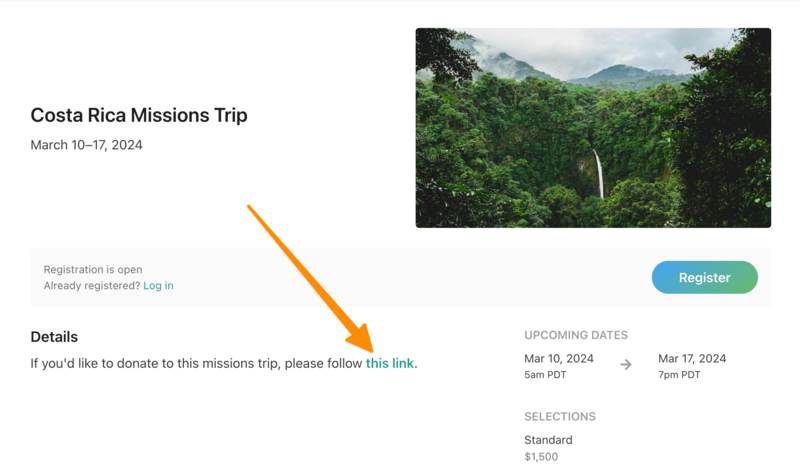
Put the fund's direct link in the event's description to allow people to donate. When someone selects that link, they'll go to the Giving page with the designated fund auto-selected.
Tip
Include the fund's direct link in a custom confirmation email as well to give people more opportunity to see it.
Adjust the scholarship amount
As donations come in to Giving, add the amount to the scholarship in Registrations to apply funds to attendee registrations.
In Giving, filter the By Donation report by "Fund" to find the total donated to that fund and create a scholarship with that amount.
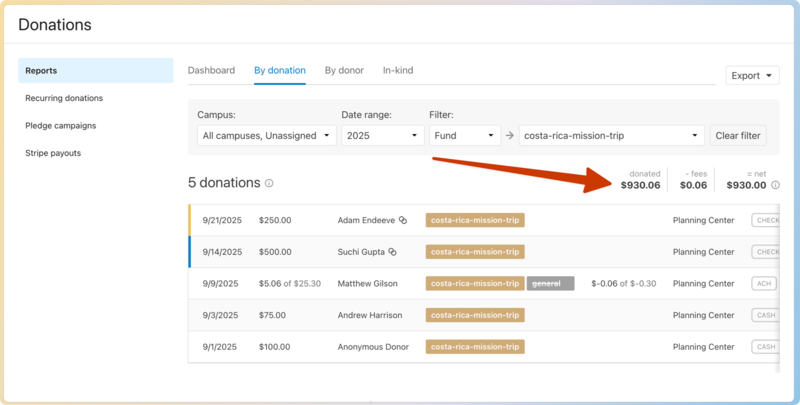
Add the total collected to the scholarship in Registrations.
Toward the end of fundraising, divide the donations as needed by applying scholarship funds to individual registrations.