Scholarships
Scholarships apply credits, such as money raised during a fundraiser or donation, toward a registration. Scholarships can only be applied by an administrator or manager.
Important
If a person wants to give tax-deductible money to fund a scholarship or apply to a specific person's registration, they cannot give it through Registrations. They can give through a donation management system, like Giving. Once you receive the donation, add the amount as a scholarship and apply it to the appropriate attendees.
Want to watch a video before you get started? No problem! This seven-minute video covers scholarships and discounts.
To create a scholarship:
Select Signups in the top navigation.
Choose the signup you're working on from the list.
Select the Configuration tab.
Select Scholarships on the left.
Select New scholarship.
Enter a name for the scholarship and the amount collected.
Select Save to add the scholarship.
If additional money is received for the scholarship, update the total to reflect that amount.
Apply scholarship funds to a registration
When a person registers for the signup, they will have to pay at least the minimum deposit, so you may need to set that to $0 if you don't want them to pay anything.
After they're registered, select Apply payment to apply a scholarship to the balance.
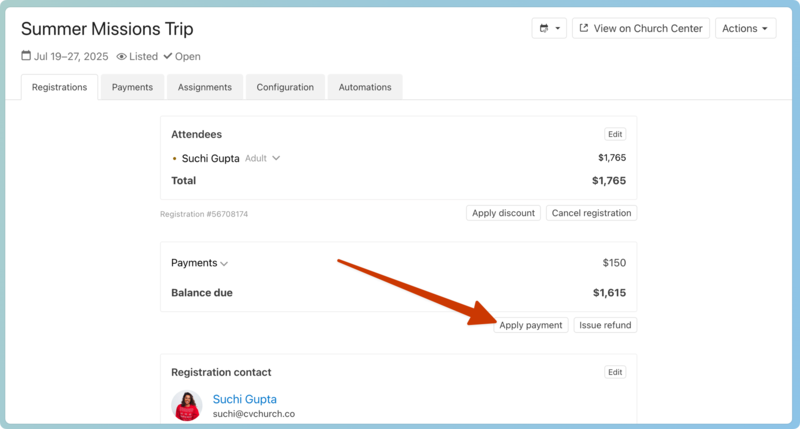
Select the scholarship and amount to apply, and then select Submit to give the scholarship to the attendee.
You may need to refund the attendee if they paid over the amount.
As you use scholarships, view the amount used and remaining on the Scholarships tab.