Create reports on attendees
If you want to generate a list of all those registered for a signup or keep track of payments, you can choose one of the built-in reports or export a CSV with more detailed information. Use these reports to get an overview of all attendees, create a list of people you can print, and more.
If you created a signup that only gathers a simple count of attendees, the only reporting option available is the CSV export.
Tip
Not seeing the report you’re looking for? There are more powerful ways to find information in Planning Center People.
Overview report
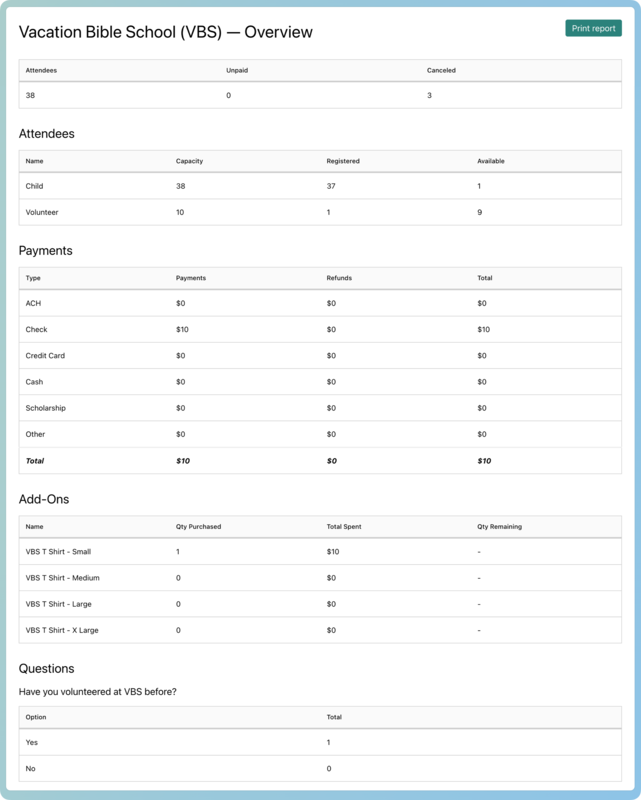
The overview report provides a full review of the signup, including the following information:
Attendees section: List of all selection types and their capacities, how many attendees are registered for each, and the remaining available capacity.
Payments section: Breakdown of payments and refunds by payment type.
Add-ons section: Number of each add-on that has been purchased or reserved and the dollar amount collected for each one.
Questions section: Number of people who have answered the dropdown and checkbox registration questions and the total for each option. Paragraph and text questions will not be included in this report.
To generate and print an overview report:
Select the Signups page in the top navigation.
Choose your signup from the list.
Select the Registrations tab.
Select the Actions dropdown on the right.
Select Overview from the list of available options. The report will open in a new tab.
Select Print report to print the report or export it to a PDF.
Guest list report
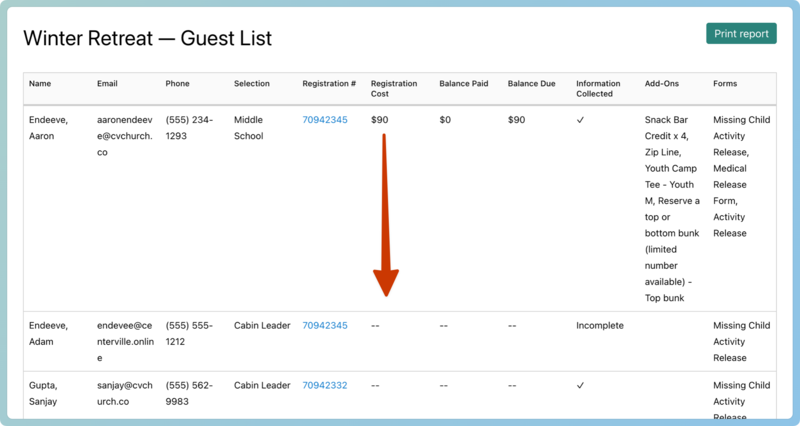
The guest list report shows a list of current attendees and a snapshot of each person's registration information, including emergency contact info, whether they've turned in required forms, and how much they owe. Canceled attendees will not appear.
Tip
Print this out for an offline version of the Registrations tab.
Select the Signups page in the top navigation.
Choose your signup from the list.
Select the Registrations tab.
Select the Actions dropdown on the right.
Select Guest List from the list of available options. The report will open in a new tab.
Select Print report to print the report or export it to a PDF.
Amounts listed in the payments columns are not attendee-specific. Amounts include all attendees in the registration group. The amount is listed once on the first attendee's line and left blank for all other attendees in that registration. Need to see more about a registration? Select an attendee's registration number to be taken to their registration details.
 |
CSV export
The CSV report contains contact and registration information for attendees. You can import it into other applications to create custom views of your signup data.
Select the Signups page in the top navigation.
Choose your signup from the list.
Select the Registrations tab.
Select the Actions dropdown on the right.
Select CSV from the list of available options.
In the Export attendees popup, uncheck the boxes next to fields you don't want included in the CSV file. You can export attendee and registration contact details, selection types, answers to questions, assignments, and more.
Select Export CSV to download the file.
To download a CSV of all the payments collected in a specific signup, select Export CSV on the Payments tab of the signup.
You can export a report of payments collected across all signups from the Payments page.