Prayer requests
When congregants ask for prayer, you can ensure the right people see their request and follow up with them using this process.
Congregants can submit their own prayer requests using a form, or administrators can add a prayer request to a person's profile using a profile note.
Manage note categories
You'll use note categories to capture the congregant's prayer request. Every organization has a Prayer Requests note category by default. If you don't see it, it may have been renamed or deleted.
Select the Overview page from the top navigation in People.
Select the Configuration tab.
Choose Manage note categories from the left sidebar.
Tip
Congregants may feel more comfortable submitting sensitive prayer requests to a smaller group, such as only pastors or staff. To ensure the privacy of the request, you can create a private note category for these prayer requests.
For each prayer request note category, add everyone who should be able to view or add a new note to this category as a collaborator. They'll need permissions in People to be added as a collaborator.
Set up notifications
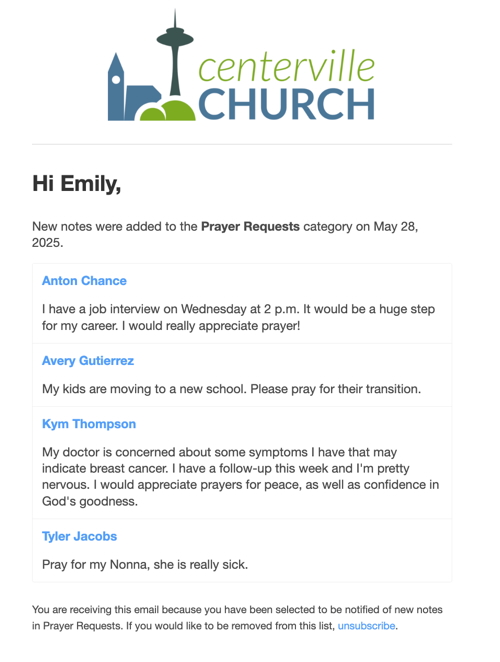
Any prayer request added to the note category will be sent to people in the Notifications list. They'll receive a single daily digest email with all of the notes from the previous day.
From the note category settings, type the names of the people on your prayer team to add them to the Notifications section.
You can add anyone to the notifications area, even if they don't have permissions in People.
Create a prayer request form
You can use forms to create a public page where congregants can submit prayer requests. When the person fills out the form, the information they enter will be added as a note in their profile in the Prayer Requests category.
Tip
Do people request prayer in person or on the phone? Administrators who are also collaborators on the notes category can add a new note to a person's profile, instead of having them fill out the form.
On the form Fields tab, add the Notes profile field and select the correct category.
Copy the form URL from the Settings tab to add it to your website, Church Center home page, or Church Center navigation.
If you want the congregant to select if the prayer request is confidential:
Add a field to indicate whether the prayer request is confidential.
When you add each note field, select the Conditions button and only show that note field if the person's answer to 'My prayer request is confidential' is 'No.'
Add a workflow field to the form to assign someone to follow up with the person who submitted the prayer request.
View prayer requests
If you’re added as a collaborator in the notes category, you’ll be able to see prayer requests in someone’s profile or on the Overview page under the Profile notes tab.
If you’re on the notification list for this category, you’ll receive a daily email digest to help you stay updated.
 |
If you want someone notified immediately when a new prayer request form is submitted, add them as a form submission notification recipient. They must also be added as a note category collaborator to see the response instead of a [hidden content] message.