Link to your donation form on your website
While you can embed or link to your donation form in Church Center, you can also share your donation form by creating a website popup or by sharing a direct link.
Create a popup on your website
If you'd prefer people to stay on your church website, use the Embedded Donation Form to create a popup on your website.
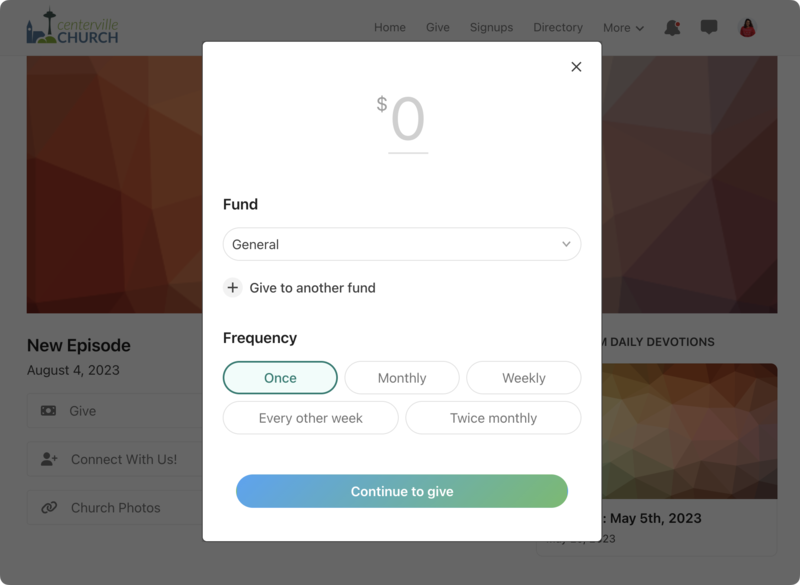
On mobile devices, the donation form always opens in a new browser window.
Your website must be encrypted (https) for ChurchCenterModal to work. On http websites, the donation form always opens in a new browser tab.
Apple Pay is available as long as the site hosting the embedded popup matches the website listed on the Organization page in Account settings.
Church Center uses an encrypted TLS connection, which may differ from your church's website. Using different encryptions can cause security alerts when payments are being collected.
When operating in an iframe, the web browser's forward and back buttons may not work correctly.
Include the ChurchCenterModal script tag on your webpage in the <head> of your document:
<script src="https://js.churchcenter.com/modal/v1"></script>
Add a link to your website (the location, name, and style are up to you):
<a href="https://yoursubdomain.churchcenter.com/giving?open-in-church-center-modal=true">Give online</a>
Tip
Troubleshooting Tips:
If the embedded form doesn't launch, view the web page's source code to ensure that those two snippets are on the page.
If the link/button is present on your website but takes you to the full un-embedded donation form, check to see if the first snippet is present in your HTML and that the website you're looking at is a secure (https) website.
If your content management system doesn't allow you to edit the <head> of your document, you can put it somewhere else. Just make sure it comes before the second link snippet.
Sometimes, anchor tags with data attributes may not be usable due to other constraints. If a need arises to open the modal programmatically, ChurchCenterModal.open(url) is the perfect escape hatch:
var urlThatWasGeneratedProgramatically = "https://yoursubdomain.churchcenter.com/giving"
ChurchCenterModal.open(urlThatWasGeneratedProgramatically)
If you're a developer, you may want to interact with the ChurchCenterModal using javascript for more fine-grained control:
ChurchCenterModal.open(url): Opens a link to Church Center in the modal.ChurchCenterModal.close(): Closes the modal.ChurchCenterModal.start(): Attach the global event handler to make data-open-in-church-center-modal="true" links open in a modal. Note: this happens automatically when the script is included.ChurchCenterModal.stop(): Remove the global event handler that makes data-open-in-church-center-modal="true" links open in the modal.
Direct link to donation site
The easiest way to link to the Giving site is to create a direct link from your main church website. Since this is HTML on your website, the style of this link is totally up to you.
Directly to a fund
To link directly to a fund, use the fund direct link for your URL. For example, this URL would link directly to your New Building fund:
https://yoursubdomain.churchcenter.com/giving/to/new-building
Suggested donation amount
To link to a suggested donation amount, you need to add some additional code at the end of the URL. For example, to pre-fill the donation form with $100, use this code:
https://yoursubdomain.churchcenter.com/giving?default_amount=100
Fund with a donation amount
You can also link both directly to a fund and include a suggested amount. For example, to link to the New Building fund with a suggested donation of $100, use this code for the URL:
https://yoursubdomain.churchcenter.com/giving/to/new-building?default_amount=100
Recurring donation
Create a link that defaults to a recurring donation by adding additional code to your URL.
https://yoursubdomain.churchcenter.com/giving?recurring=true