Connect a third-party integration to Giving
External platforms typically allow you to connect to Planning Center from their system, granting access to your Planning Center account from within the external account settings for that system.
Once a third-party system has been connected to Giving, donations added by that system will identify themselves as a payment source in Giving.
You can find a list of known integrations on Planning Center's Integrations page. While some of these integrations have been built by Planning Center, most are built and maintained by third-party companies. If you have any questions about how an integration works, contact the company directly.
Connecting third-party software
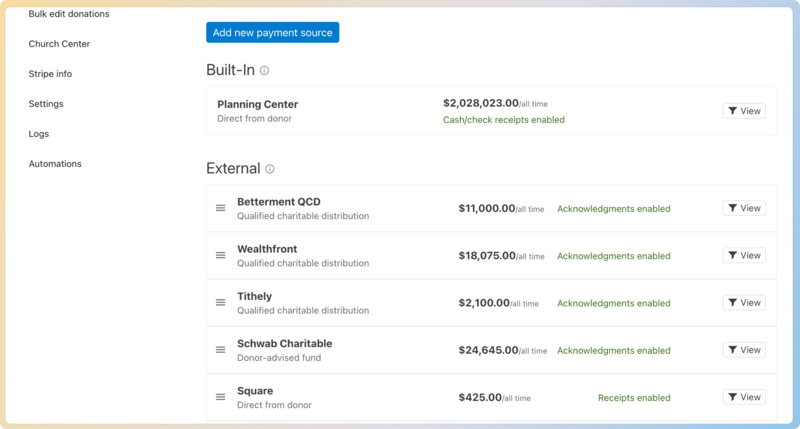
Go to the Payment Sources tab on the Manage page to see your active payment sources.
 |
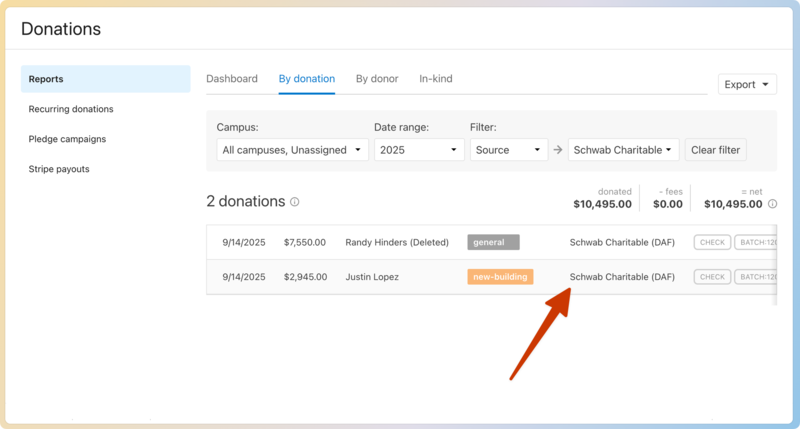
After an external payment source is added (whether manually by you or automatically after connecting a new third-party integration), you'll see a new column added to the table of donations throughout Giving. This new column will show you the payment source for each donation.
 |