Lyrics & Chords editor
You can use the Lyrics & Chords Editor to create and edit lyric and chord charts from a Song Arrangement page.
Tip
Lyric & Chord charts created using the editor don't count toward your file storage and won't appear on your Files page!
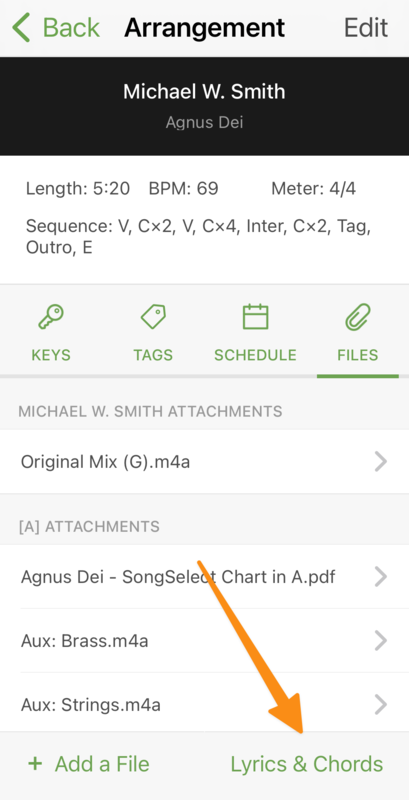
From a Song Arrangement file attachments tab, tap Lyrics & Chords to open the editor.
 |
Edit Lyrics & Chords
From the Lyrics & Chords editor, you can edit the lyrics and chords for the arrangement.
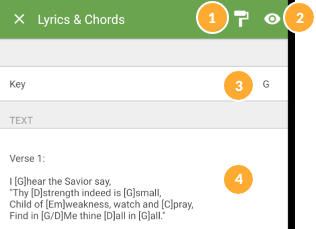 |
Format the song sheet.
Preview a PDF of the song sheet.
Choose the key you will use to type out your chord chart.
To edit the text, tap the text area of the page to access the touch keyboard. Edit your lyrics or chord chart using ChordPro or standard chords.
When you save your changes to Lyrics & Chords, transposed chord charts are automatically created for every key added to the arrangement. You can view these transposed PDFs from the Files section.
Enable lyrics, numbers, and numeral charts
You can create the following additional PDFs from the bottom of the Lyrics & Chords page:
Lyrics: All chords are stripped out, leaving only lyrics and section headings.
Numbers: Chords are converted to the Nashville Number system, replacing chords with the number they represent. Because these charts don't contain specific chords, one chart can be used for any key.
Numerals: Similar to Numbers, but uses Roman numerals instead of simple numbers.
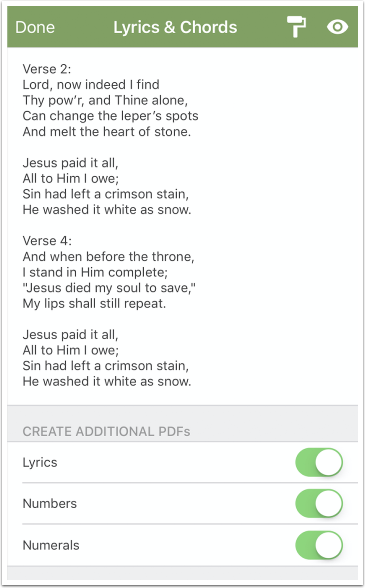
The PDFs you create are available as file attachments when you go back to the Arrangement page.