Quick check in tips
Once you've created the event and launched your station, you can check people in from a manned, self, or roster station. Use our tips from each station to check people in quickly and keep those lines short!
Search
You can search for someone by typing their whole name or phone number, or you can follow our tips for checking someone in even faster!
Manned station
On a manned station, enter the person's name to begin checking in the household or individual. For the fastest search, type the first two letters of the first name and the first two letters of the last name.
Check people in by tapping the empty boxes next to their names.
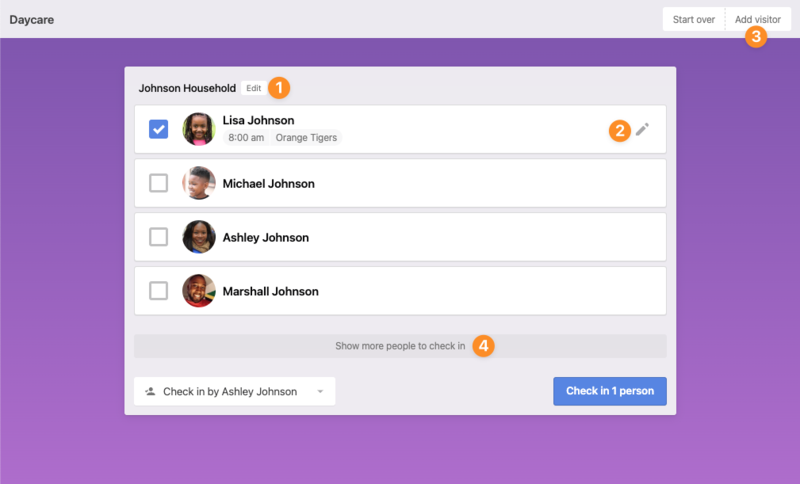
Add a member to the household or change a person's information.
Tap the pencil to check the person into the right place with the correct status of Regular, Guest, or Volunteer.
If a person comes with the household but isn't a part of the household, add the person as a visitor. A label will print for them, but they will not be added to the database.
Show other people you're able to select for check in.
Important
This will show inactive people in your household and people for whom you are a trusted person. Anyone with an inactive reason of deceased will not be displayed.
Self station
To check in members of your household, enter at least the last four digits of your phone number on a self-station.
Important
If another person has a phone number similar to yours, you may have to choose your household from a list.
You can check people in by tapping the empty box by their name. If the checkbox is missing from the screen, they've already been checked in.
Scan
Use the scanner to scan a Church Center QR code, a barcode, or a mobile pass for faster check in!
Warning
An administrator must enable the Church Center mobile app or add a barcode or mobile pass for them to be accessible from the scanner.
Check-ins shortcuts
The shortcuts below can help speed up your flow while using stations on mobile or desktop devices.
Mobile
Shortcut | Action |
|---|---|
| Move within the interface. |
| Toggle selection or submit page. |
| Cancel or go back. |
| Start over. |
Desktop
Shortcut | Action |
|---|---|
| Toggle full screen on Windows. |
| Toggle kiosk on Windows. |
| Toggle full screen on Mac. |
| Toggle kiosk on Mac. |
| Open the search bar. |