Use location options for additional information
Some locations need more information about the person checking in. For example, are they potty-trained? Did they bring a backpack? Use location options to gather that information at a manned or self station and make sure that the backpack goes home with the right person.
Important
You can only manage location options from the folder or location where they were created.
To add location options, follow these steps:
Select the Events page from the top navigation in Check-Ins.
Choose the relevant event.
Select the Labels & Locations tab from the left sidebar.
Choose the relevant folder or location where you want to add the options.
Under the Options section, select Add a Location Option.
Add an option description and check the box next to Print if you want to print a label for this option. This can be helpful for people who may need an extra name label to attach to backpacks or diaper bags.
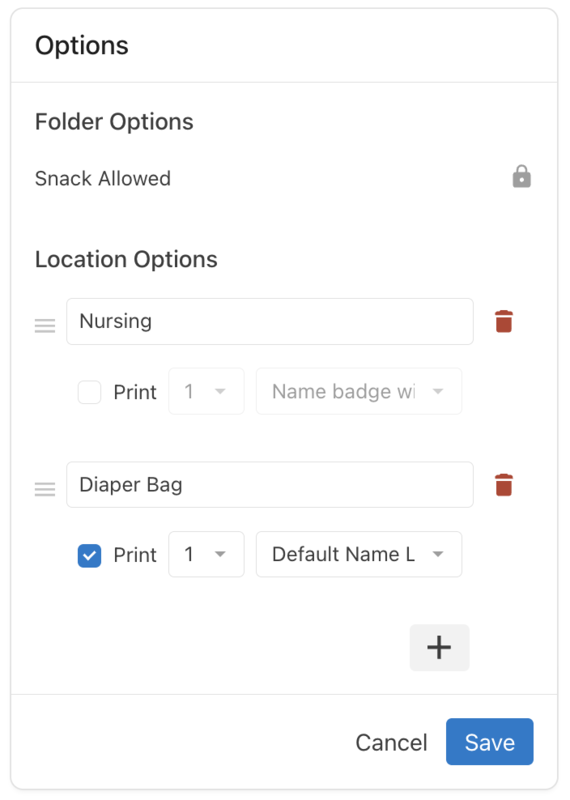
(Optional) Select the ➕ plus sign at the bottom to add more options.
Select Save to keep the entered options or Cancel to remove any changes you made.
(Optional) To edit existing options, select Add/Edit Options.
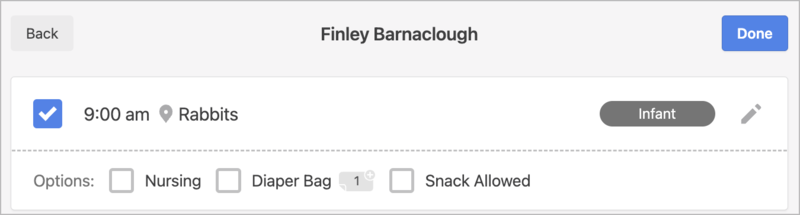
When someone checks into that location on a manned or self station, they can select the ✏️ edit icon next to their name to see the location options and check the ones that apply. The selected options will automatically be selected for future check-ins until they are deselected.
 |
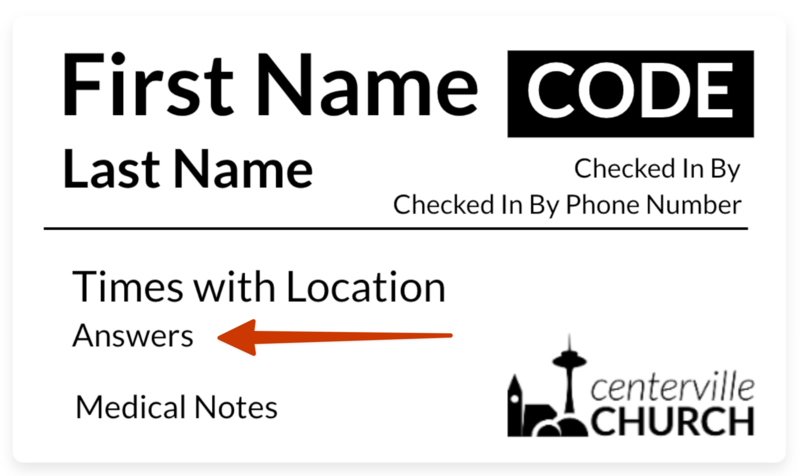
Location options are automatically included and will print on the default name label. If you've created a custom label, add the Selected Options field. In the label editor, this appears as an Answers placeholder.
 |
If you checked the box next to Print for a specific location option, the additional label(s) will also print.