Help people log in
Each person with permission to access your account will log in using their login method, which can be an email or phone number. When they log in for the first time, the email or phone number listed on their profile will become their login method. A person can change their login method at any time.
You can quickly see a person's login method by taking a look at their profile in People. The login method is located directly above the Contact information section.
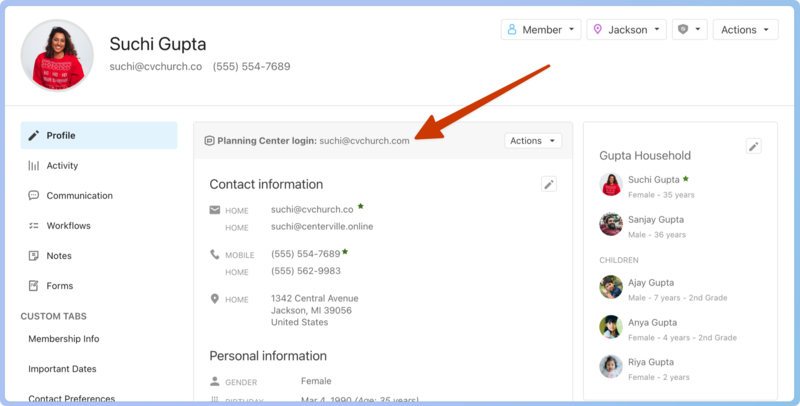
If a person is having trouble logging in, use the Provide help options to help them.
In People, search for a person's name using the 🔎 search icon in the top navigation.
Select their profile from the results.
Select Actions next to Planning Center login.
Choose Provide help from the dropdown.
Choose between the options listed in the table below and follow the instructions to provide assistance to the person experiencing the login issue.
Problem | Solution |
|---|---|
They forgot their password. | Send this person a password reset email. |
They need to change their login email or phone number. | Send instructions to this person to change their login email. |
They can't log in because of two-step verification. | Turn off two-step verification for this person. |
They can't log in, can't reset their password, and can't access their login email. | Update this person's login email after verifying information through safety checks. |
They receive an 'We are unable to send a password reset to this email...' error while requesting a password reset. | Use the forgotten password process to unblock their email address and send them a password reset email from the Account Login Help options. |
Important
Any time a person's login method is updated, they will be logged out of all active sessions, and this event will be tracked in the Security History log located on the People page in Account settings.
If a person has duplicate profiles that use different login methods, they will need to change the login methods to be the same before the profiles can be merged.