Register for an event
Your church probably hosts events like VBS, potlucks, and more! With Church Center, you can view those upcoming events and register to join.
To view your church's events, use the bottom navigation to find your church's event page.
Select the event you want to register for. If you can't find it, try filtering the search by campus or category to narrow your results.
Tap Register.
Log in to Church Center using your email or phone number.
Complete each step of the registration, providing all requested information. Each registration is different, so you may have options to register for a specific date or register additional people.
If the event occurs on different days, you may need to register for only specific dates. Select View availability under a date/time option to see how many spots are available for each selection. Select the dates/times to see how many slots remain for each selection.
If the event allows you to register others, you can select Add a new person to register someone outside your household.
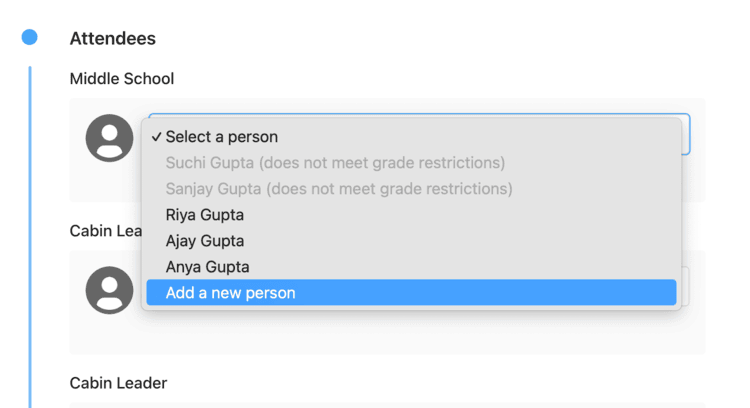
You'll need to enter their first name, last name, and any other required information. If you have the option, add this person to your household by checking the Add this person to my household box.
Submit your registration.
Next, you will see the confirmation page where you can complete any additional forms, edit answers to questions, and pay any remaining balance. You will also receive a confirmation email with links to complete the same actions.
Tip
Need to register again? Follow the steps in Manage registrations and payments to register yourself or another person for the same signup.
You may run into situations where you cannot register for an event. Check the table below to better understand why you can't register and what you should do to move forward.
Signup status | Explanation |
|---|---|
Not on sale | An event is listed as not on sale if no public selections are available. Contact an administrator at your church to register for this event. |
Registration closed | A signup listed as closed is not currently accepting new registrations. Check with your church to see if registrations are still being accepted. |
Selection full or sold out | If a selection in a free signup reaches its maximum capacity, it will show as full. If a selection in a paid signup reaches its maximum capacity, it will show as sold out. |
Signup full or sold out | If all selections of a free signup reach capacity, the signup will show as full. If all selections of a paid signup reach capacity, the signup will show as sold out. |