View your scheduled plans
Keep track of the plans you and your household members have been scheduled for or requests you haven't responded to in the Schedule section of the Me page.
Enable household scheduling
If you're part of a household with other volunteers and have permission to manage someone's schedule within your household (adults automatically have permission for minors in their household), you can enable household scheduling in Church Center.
With this setting enabled, your Me and My Schedule pages will show volunteer requests, signup opportunities, and confirmed shifts for people in your household whose schedule you can manage, each with a profile picture or initials so you know who's who.
View scheduled plans
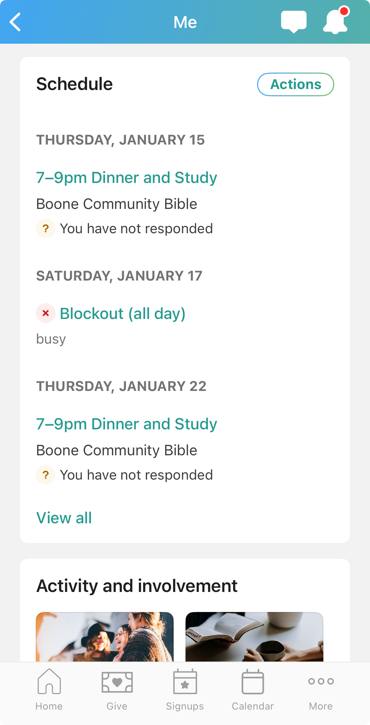
Tap your photo or initials at the top of the app to open the Me page.
Select View all at the bottom of the Schedule section.
Tap Accept next to any new scheduling requests to confirm you're available. Tap More... if you need to decline a request or submit different responses for multiple positions.
If your team leader has enabled volunteer replacements, you can choose your replacement from a list of available volunteers who can fill your role. Choosing a replacement automatically confirms them for the plan, so make sure to coordinate with them before declining.
If you've been requested for multiple positions, choose whether to Accept or Decline each individual position, then select Submit response.
Tap Actions to:
Accept all scheduling requests.
Add blockout dates for times you are not available to serve.
Email your team leader.
Subscribe to a calendar feed of your entire schedule, including assigned plans, blockout dates, bookmarked events, group events, and events you have registered for.
View all confirmed plans and blockout dates in the list of events. Tap a confirmed date to open plan details, including your position, times, and notes for which you are assigned. If you're on a rehearsal team and you have the Services mobile app installed on your device, you can tap View in Services to open that plan in the app.
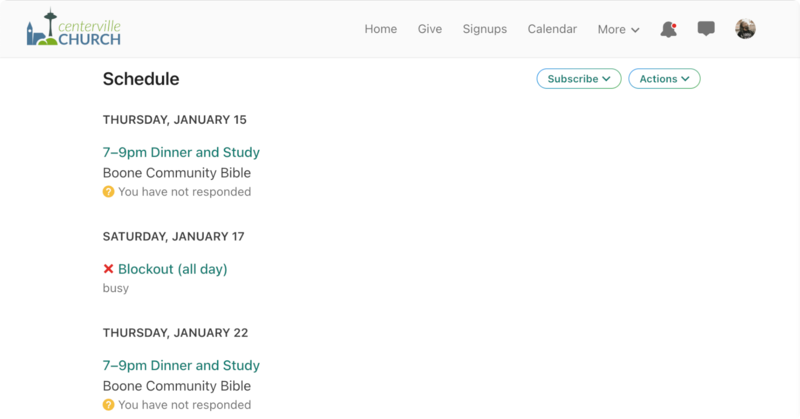
Select your profile picture or initials at the top of the page to open the Me page.
Select View all at the bottom of the Schedule section.
Select Accept next to any new scheduling requests to confirm you're available. If you need to decline a request, select More... followed by Decline...
If your team leader has enabled volunteer replacements, you can choose your replacement from a list of available volunteers who can fill your role. Choosing a replacement automatically confirms them for the plan, so make sure to coordinate with them before declining.
If you've been requested for multiple positions, choose whether to Accept or Decline each individual position, then select Submit response.
Select Actions to:
Accept all scheduling requests.
Add blockout dates for times you are not available to serve.
Email your team leader.
View all confirmed plans and blockout dates in the events list. Select a confirmed date to open plan details, including your position, times, and notes for which you are assigned.