Update contact person for a registration
There will always be a need to contact people who register with important details about a signup. To fill this need, every registration that you receive is assigned a registration contact. The registration contact acts as the person who receives all notifications about the registration.
Who is the registration contact?
By default, the person who submits the registration on Church Center, or the registrant, becomes the registration contact. For example, a parent who logs into Church Center with their own information and registers their child will be listed as the registration contact.
If an administrator registers people in Registrations, the first attendee entered becomes the registration contact. You can change the registration contact before completing the registration or edit it later in the registration details.
You can see all signups where a person is listed as the registration contact from the Registrations tab on their profile.
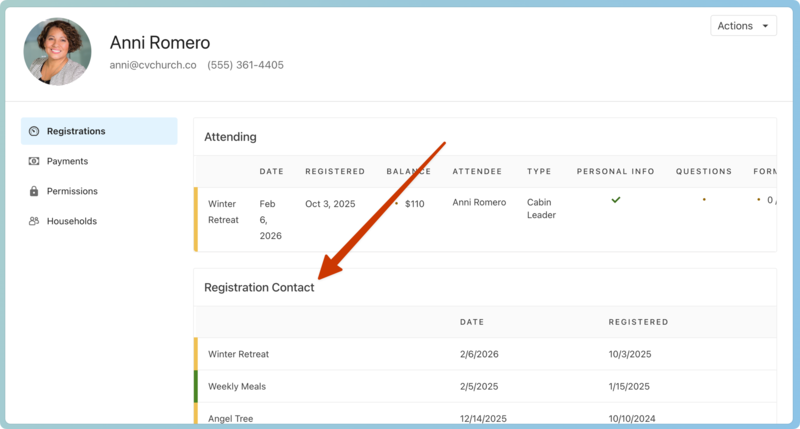
Change registration contact
You can change the registration contact for a registration group from the registration details.
Select the Signups page in the top navigation.
Choose the signup from the list.
Select the Registrations tab.
Select the name of the attendee from the list of registrations.
Select Edit in the Registration contact section of the registration details.
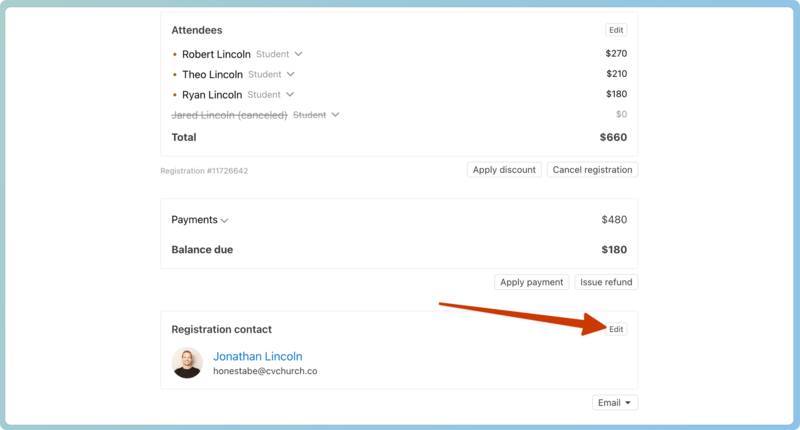
Choose another attendee's name from the dropdown or choose Someone else... and search for a person's name to assign them as the registration contact.
Select Save to update the registration contact.