Transpose your charts
If you're viewing a chord chart that was created using the Lyrics & Chord Editor in Services, you can quickly view it in another key or as a number/numeral chart.
Important
This temporarily transposes the chart for viewing purposes only and doesn't affect the song item in the service order. The song in the plan will still show the originally assigned key.
To quickly transpose a chart:
Tap the menu icon (three horizontal lines) in the top left to open the sidebar.
Select the Plans tab.
Select a plan date from the list to open it.
Select a song from the service order to view the chord chart.
Tap the center of the screen to show the top toolbar.
Tap the circled key in the top right.
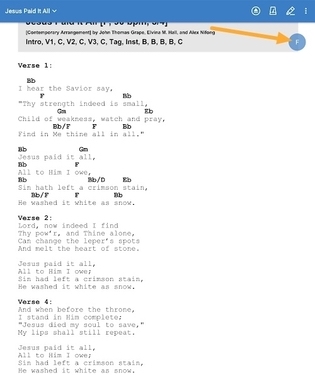
Choose a different key from the listed options, or choose to view a Number or Numeral chart.
Important
Only you will see the chord chart in the transposed key. Other people viewing the plan will still see the original chord chart.
Tap the circled key and choose Default Key to return to the originally assigned key.