Transpose charts in Music Stand
If you're viewing a chord chart that was created using the Lyrics & Chords Editor in Services, you can temporarily transpose it by viewing it in another key or as a number/numeral chart.
This temporarily transposes the chart for viewing purposes only and doesn't affect the song item in the service order. The song in the plan will still show the originally assigned key.
Important
You can only temporarily transpose charts that were created using the Lyrics & Chords Editor.
To temporarily transpose a Lyrics & Chords chart:
Tap the menu icon (three horizontal lines) in the top left to open the sidebar.
Select the Plans tab.
Select a plan date from the list to open it.
Select a song from the service order to view the chord chart.
Tap the center of the screen to show the top toolbar.
Tap the circled key icon in the top right. If the circled key doesn't appear, this chord chart wasn't created in the Lyrics & Chords Editor and cannot be edited.
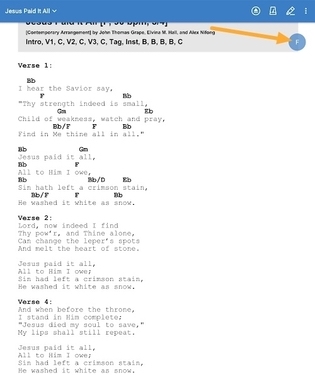
Choose a different key from the listed options, or choose to view a Number or Numeral chart.
Important
Only you will see the chord chart in the transposed key. Other people viewing the plan will still see the original chord chart.
Tap the circled key and choose Default Key to return to the originally assigned key.