Donor numbers
If your organization uses numbers to identify donors, like using numbered envelopes, you can assign and manage those in Giving using the Donor numbers feature.
Enable donor numbers
Before donor numbers can be assigned, this feature must be enabled within your Giving settings.
Select the Manage page in the top navigation in Giving.
Choose the Settings tab from the left sidebar.
Scroll down to the Donors section.
Select the checkbox next to Use donor numbers.
Assign donor numbers
Once enabled, you can assign a number to a donor from their profile page.
Select the People page in the top navigation in Giving.
Type the person's name, email, or phone number in the search box.
Select the person's name from the dropdown to open their profile.
Select the # box next to the person's name.
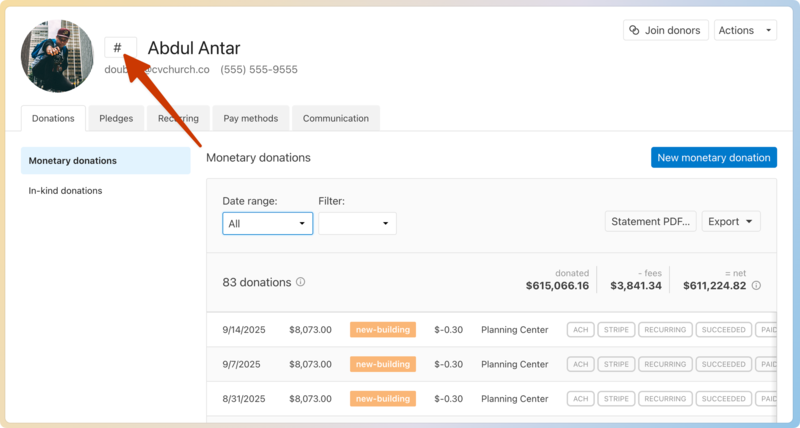
Enter their donor number.
Press
returnortabon your keyboard to save.
Search by donor number
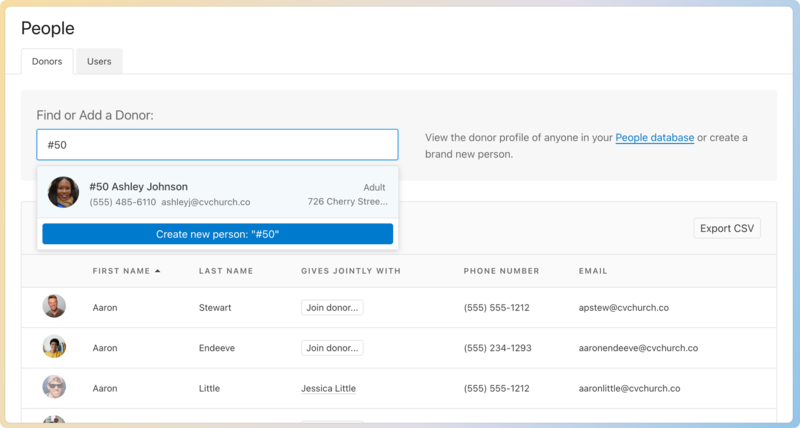
You can search for a person using their donor number by typing # in the search box, followed by their donor number.
Export donor numbers
You can download a CSV file with information on all donors, including donor numbers.
Select the People page in the top navigation in Giving.
Select the Export CSV button at the top right of the donor list.
Donor numbers are included as the second column in the exported CSV file.
