Print to another station
If you have limited printers or use devices that can't connect directly to your printer, you can print to another station.
You can set up a station to print to another station from the station device's settings or when using Check-Ins in a web browser.
Important
The selected station must be active in order for it to print. If you see an error message after setting a station to print to another device, open the Check-Ins app on the selected station device.
On a station device
Open the Check-Ins app on your station device.
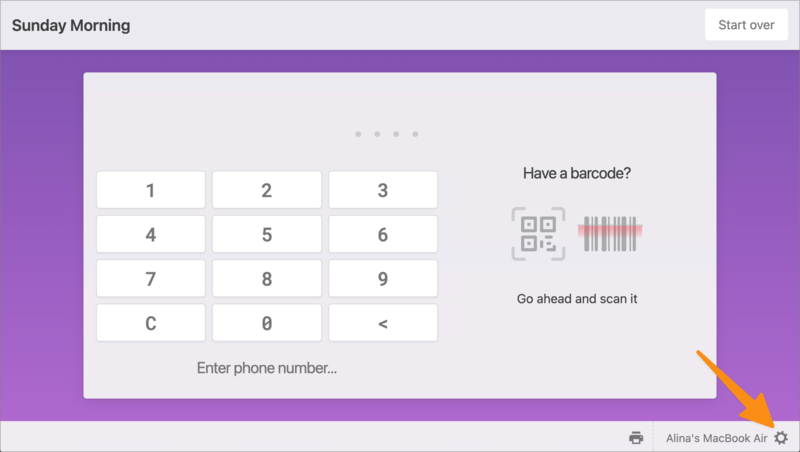
Tap the ⚙️ settings icon in the bottom right corner of the screen.
Important
You must have a station key to access the station settings page from the station device.
Use the Print station dropdown to choose where you'd like this station to print from.
Select Save to apply your changes.
On the web
You can also set a station to print to another station when using Check-Ins in a web browser.
Select the Stations page from the top navigation in Check-Ins.
Select a station from the list to open its settings.
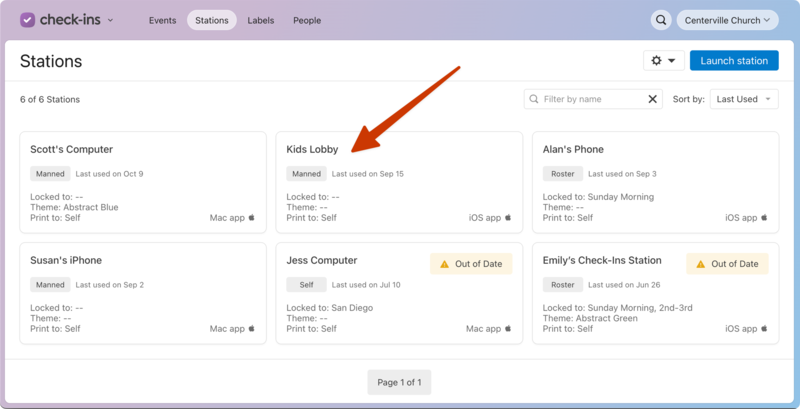
In the popup, use the Print station dropdown to choose where you'd like this station to print from.
Select Save to apply your changes.