Add and manage payment methods
Payment methods are shared on Church Center, which means you can add a payment method to your profile and use it to donate or pay for a registration.
Supported saved payment methods include:
Debit and credit cards
Canadian debit/credit cards: While all major credit cards are supported by Canadian organizations, only a limited number of debit cards will work. Visa Debit is supported, but Interac ATM cards or cards without a 3 or 4-digit CVC code are not.
Bank accounts: Available in the United States and Australia.
Important
Other available payment methods include Apple Pay and Google Pay, but they cannot be saved to your profile. Google Pay is only available on the web.
Add a new payment method or delete an existing one from the Payment methods tab of your profile.
Add a credit or debit card as a payment method
Add your bank account as a payment method
Once your bank account is added as a payment method and verified, you can use it for donations and payments on Church Center.
Important
Giving with a bank account (EFT) is only supported in the United States and Australia.
Follow the steps below based on your location to get started.
US bank accounts
US bank accounts can be used for payments only after they have been verified. You can verify your bank account by connecting to your online banking profile (instant verification) or using manual verification, depending on which option is available for your bank.
People in the US who can't connect to their bank accounts can use manual verification instead. Manual verification involves entering your bank details, receiving a $0.01 micro-deposit from Stripe, and entering the attached code.
Select your profile picture or initials at the top of the app.
Select My information and settings.
Select Payment methods.
Select Add payment method.
Choose US bank account.
Select Enter bank details manually.
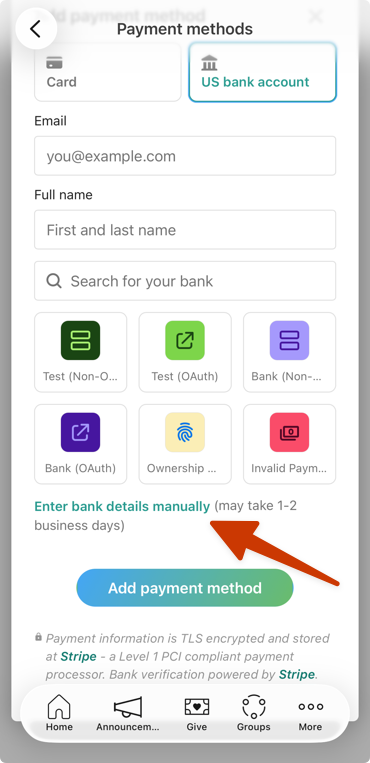
Enter your routing number and account number.
Select Submit.
Select Done to return to the Add US bank account page.
Select Set up to complete the process.
Select your profile picture or initials at the top of the page.
Select My information and settings.
Select Payment methods.
Select Add payment method.
Choose US bank account and enter your email and full name.
Select Enter bank details manually.
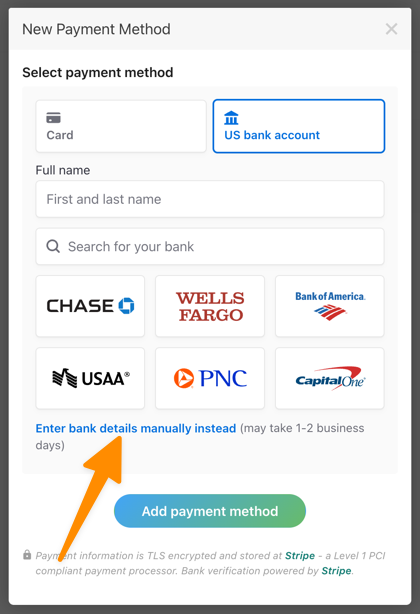
Enter your routing number and account number.
Select Submit.
Select Back to [church name] to return to the New Payment Method page.
Select Add payment method to complete the process.
After you've added your bank account, you'll receive a $0.01 micro-deposit from Stripe. Once you've received the deposit, follow the steps below to finish the verification process.
Australian direct debit
Delete a payment method
Payment methods can be deleted from the Payment methods tab of your profile.
You can't delete a payment method that is currently attached to a recurring donation. To delete the payment method, first edit your recurring donation to use a different payment method.