Add and manage group resources
Resources are the items you need to share with your group, from study guides and short videos to group photos and notes. Use Church Center to share resources with the groups you lead!
Supported file types and sizes
The types of files that you can add to a group include:
Documents like PDFs, Microsoft Word files, and text files.
Media like small audio, video, or image files.
The maximum allowed file size is 50MB. For larger files, upload the file to a separate hosting platform and create a private link to the file that you can share from the Resources page.
You can host larger media files on a service like Dropbox, Google Drive, or Amazon S3.
Large video files can be posted on a video platform like YouTube or Vimeo.
Add a resource
Depending on the resource's access level, the appropriate leaders and members are notified when a new resource is added in Church Center.
Tip
Members can manage whether these notifications only occur in the mobile app or are also pushed to their phones by updating their notification preferences.
Edit a resource
Follow the steps below to edit a resource's name, description, or access. You can also pin resources to the top of the list to make them easier to find.
Delete a resource
Warning
Deleting a resource cannot be undone.
View and sort resources
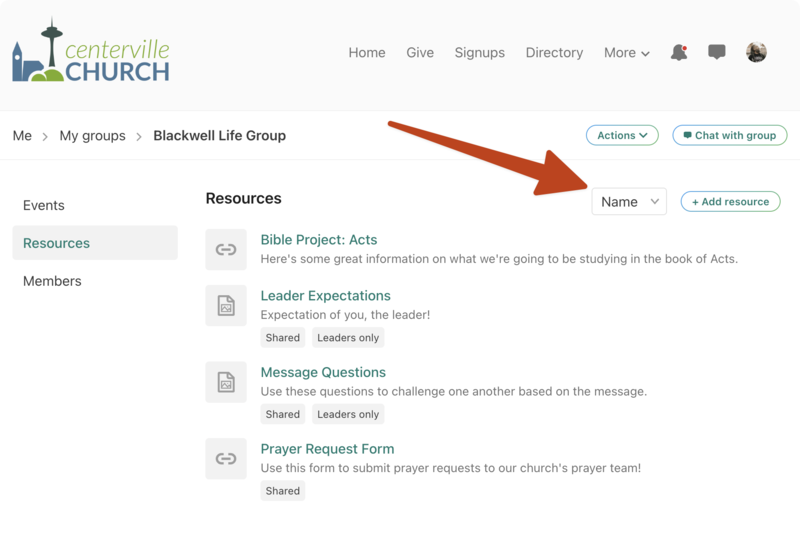
The icon next to a resource indicates its type (e.g., image, PDF, link) at a glance. Some resources are also labeled to differentiate access:
Resources with a Shared label are accessible across multiple groups or group types and can only be managed by administrators.
Resources with a Leaders only label can only be accessed by that group's leaders.
You can sort resources by Name (alphabetically) or Last Updated (date) using the arrow icon at the top of the list.
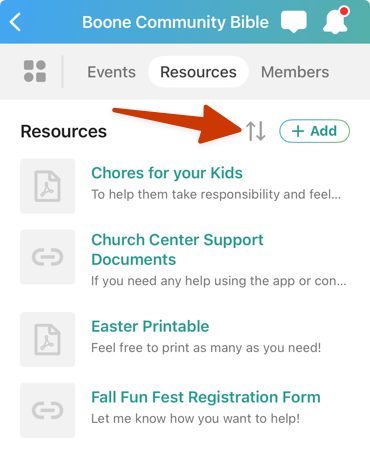
You can sort resources by Name (alphabetically) or Last Updated (date) using the dropdown at the top of the list.