Partial payments
Partial payments allow you to require only a minimum deposit at the time of registration.
Partial payments belong to selection types and add-ons. Check the box to Allow partial payments, and enter the minimum deposit amount.
If you add a minimum deposit, that deposit will need to be paid by an online payment before your attendees can complete the registration form.
Important
If your signup is set to allow cash or check payments, attendees will be able to skip the minimum deposit.
Select Signups in the top navigation.
Choose the signup you need from the list.
Select the Configuration tab.
Choose Selection types on the left.
In the Options section, check the box next to Allow partial payments.
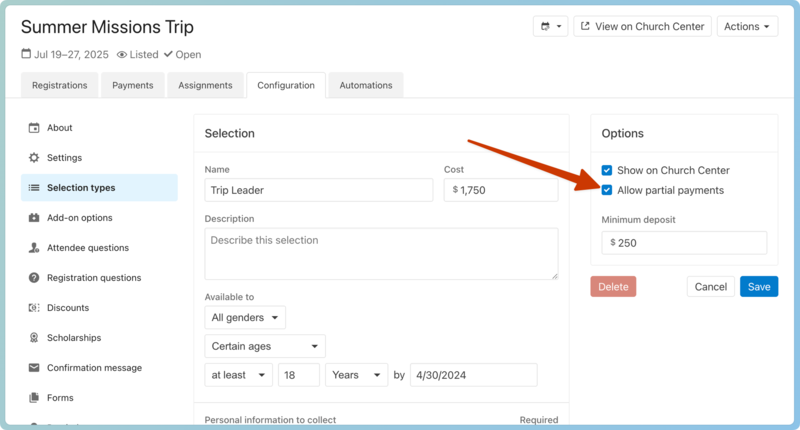
Select Save.
On the event page
Once partial payments are enabled, attendees can pay the full amount, the minimum deposit, or a specific amount.
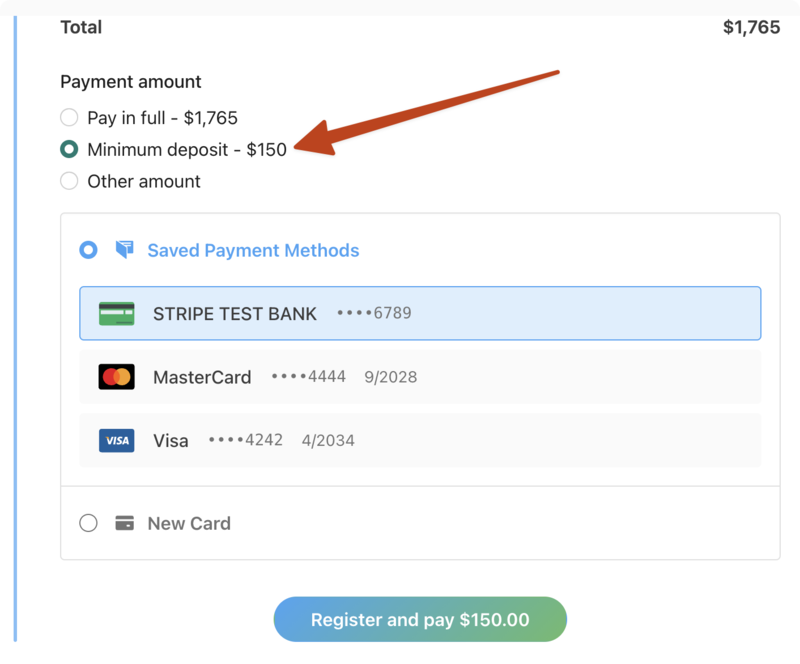
How do they pay the remaining balance?
The confirmation email includes a link directing them back to the final registration page, where they can make additional payments.
Administrators can apply a payment to a registration and see any payments made on the Payments tab or page.