Register pairs for a signup
For signups with a combined cost for multiple people, such as couples registering for a marriage conference or teams for a tournament, getting both people to register correctly can be tricky. Use the tips below to help make the process much easier for people registering together.
Add selections
In the signup, create a selection for each role when registering themselves and their partner.
If you want to add an option for singles to be paired by admins, also add a selection type for them.
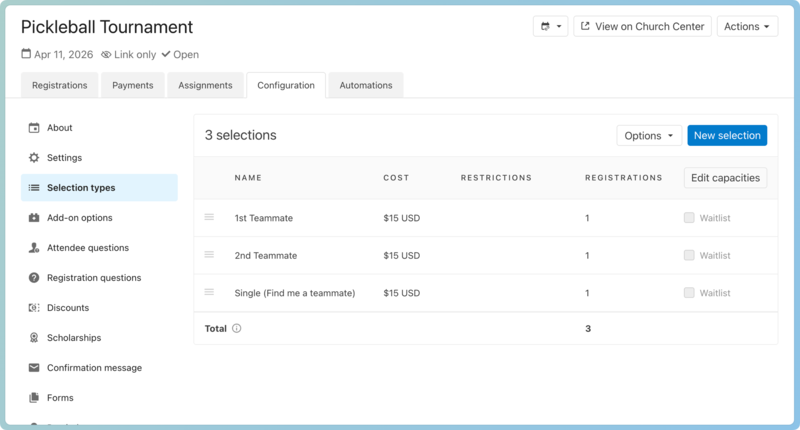 |
Tip
If the event allows childcare at a cost, you can also add a "child" selection for parents to register and pay for their children along with their registration.
Update household settings
From the Settings tab of the signup, you can allow people to add household members while they register. If their partner should be listed in their household, this setting will enable them to add them.
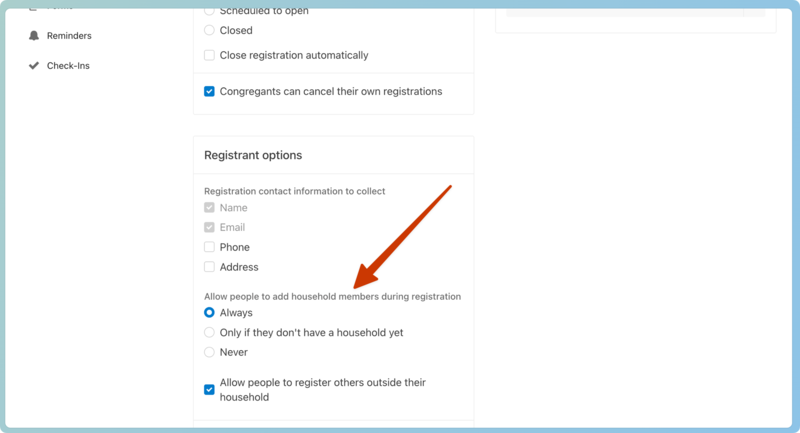
If their partner is not in their household, but you still want them to register together, check the box to allow them to register people outside their household.
Group discount
Once you've paired them and combined their registrations, you can set a group discount to give them the same rate as their teammates.
To create the discount:
Give your discount a name that describes what it is for.
Set the amount you want to adjust the cost by whether it's taken off per person or just the second person.
Select Group as the discount type. The group number tells you the number of people charged for the event.
If the rate is for the 2nd person only, set the minimum to 1, and choose to apply it to everyone after the first attendee.
If the discount amount is per person, set the minimum to 2 and Apply to all attendees in the group.
In the Options box, choose to only make it available for the Single selection.