Share your public signups
After you've created signups, you'll want to share them with others to collect registrations. All signups set to visible and open appear in Church Center, where people can view them and register online. You can choose the order in which signups appear, then copy the Church Center URL to share a link to the main signups page or an individual signup.
Arrange signups
Choose how signups are displayed on Church Center from the Signups page in Registrations.
Select the Signups page in the top navigation in Church Center.
Select the Church Center dropdown.
Select Update settings.
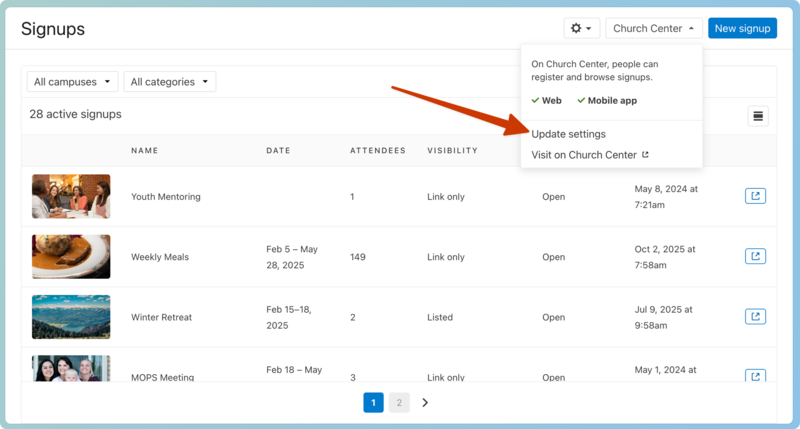
Choose how you'd like signups to be displayed from the following options:
By date, with undated on top
By date, with undated on bottom
Alphabetically by title
Featured signups will always display at the top of the list, regardless of the setting you choose. Signups with a date in the past will not be removed from the signup list on Church Center automatically. Instead, consider setting a signup to be hidden on Church Center automatically from the signup's settings.
Copy Church Center URL
When you're ready to share your signups with others, share the Church Center URL to the full signup list or an individual signup.
Important
It is not possible to collect registrations using a kiosk. Signups are designed to be collected through Church Center via a smartphone, tablet, or personal computer, which is much more secure than a public kiosk, especially when personal information is being provided. If someone is struggling to register themselves, an administrator can register them through Registrations.
Share Signups page link
To share the Signups page on Church Center:
Select the Signups page in the top navigation in Registrations.
Select the Church Center dropdown.
Select Visit on Church Center.
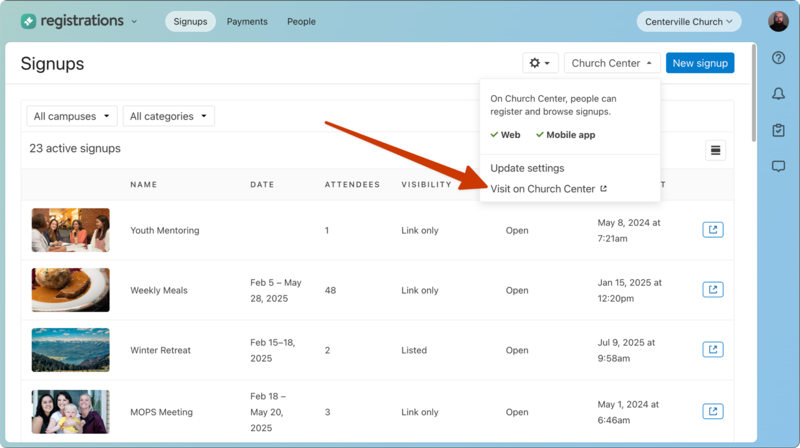
Copy the URL to share with others in emails, on your website, or anywhere else a link is needed.
Create a QR code
For easy in-person sharing, download a QR code from Church Center!
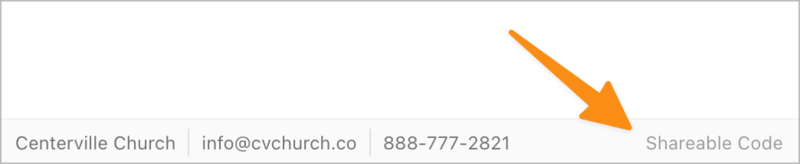
Select Get QR Code at the bottom of any Church Center web page to view and download the QR code for the page. Use this code for a church bulletin, a lobby poster, or an announcement slide. People can scan the QR code to go straight to this URL without typing it.
Tip
Print QR codes on Avery 22805 square stickers and put them in prominent places at your church!