Avoid being marked as spam
Mobile carriers monitor spam based on opt-out rates. While a few opt-outs are not bad, a high opt-out rate usually indicates that consent to text was not obtained from each recipient or that the sender is sending too many messages to recipients.
To keep a low opt-out rate and prevent mobile carriers from suspecting your organization of sending spam/scam content, follow these guidelines:
Implement and maintain a proper opt-in process with a consent form. Ensure that only people who consented to texts are on lists you send texts to, and check in with your recipients every ~18 months to ensure they still want to receive messages.
Include your church name in each text. For example, “Centerville Church: Tomorrow is brunch and board games! We'll bring the brunch, you bring the board games, and meet in the gymnasium at 9:00am!”
Avoid all caps or frequent abbreviations.
Don't embed links, email addresses, or phone numbers.
Avoid sending excess links, and when you do send a link, give clear context of where the link leads.
Don't send shortened URLs.
Don't include any SHAFT (sex, hate, alcohol, firearms, tobacco) content.
What happens when someone opts out?
If a recipient replies with a “STOP” message, they receive an unsubscribe confirmation text and no longer receive messages from your church.
If someone unsubscribes, icons on their profile show that the number is textable, but the person has unsubscribed.
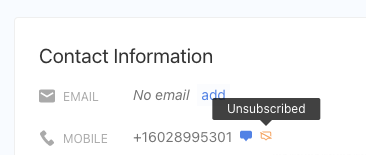
If they want to receive messages again, they can text "START" to the organization's 10-digit number.