Create tags
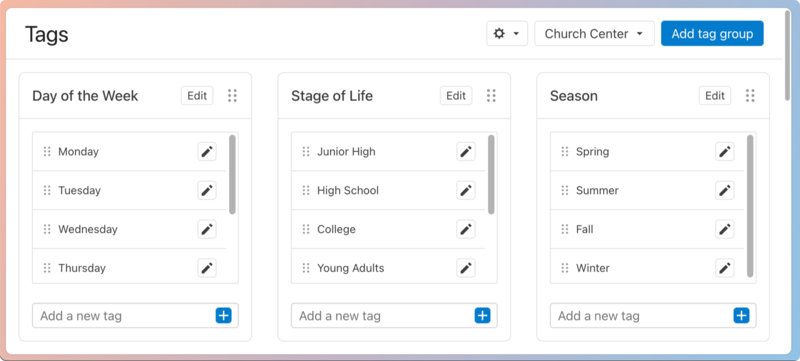
Tags help add extra information about your groups, determine the filters for group search in Church Center, and organize the group list and Reports pages. You can customize each tag group by adding different tags, which congregants and administrators can use to sort and filter searches, making it easier to find the groups they need.
Want to watch a video before you get started? No problem! This six-minute video will show you the steps in this article in action.
Create a new tag group
If you haven't set up any tags, you must first create a tag group.
Select the Groups page in the top navigation.
Select the ⚙️ settings icon in the top right.
Choose Tags from the dropdown to open the Tags page.
Select the Add tag group button in the top right corner of the page.
In the New tag group popup, enter a name for the tag group and then choose whether or not to display the tag on Church Center and whether or not to allow multiple tag selections.
Select the Save button.
Add a new tag to a tag group
Select the Groups page in the top navigation.
Select the ⚙️ settings icon in the top right.
Choose Tags from the dropdown to open the Tags page.
Find the tag group you'd like to add a new tag to.
Type the name of the new tag in the add tag field.
Select the ➕ plus sign icon to save the new tag.
Once you've added a tag, you can assign it to a group from that group's settings page. Tags must be assigned to at least one listed group in a group type before they appear as search filters in Church Center.
Edit or delete tags
Warning
Deleted tags cannot be recovered and are removed from any groups to which they were assigned.
Select the Groups page from the top navigation.
Select the ⚙️ settings icon in the top right corner of the page.
Choose Tags from the dropdown to open the Tags page.
Find the tag group that holds the tags you want to edit or delete.
Select the ✏️ edit icon next to the tag.
To edit a tag, make your changes, and then select the ✅ check mark icon.
To delete a tag, select the 🗑️ delete icon. Deleted tags cannot be recovered and are removed from any groups they were assigned.