Archive or delete a group
When a class or quarter is over, administrators can archive or delete a group to remove it from the active groups view. Both actions have different implications, so here's a quick rundown to help you decide which is right for you:
Archiving a group preserves membership records, resources, chat history, event history, and attendance data in case it needs to be unarchived later. Keep the following in mind:
Chat conversations are archived and future events are removed.
Unarchiving restores the same members, resources, chat conversations, and past events. Those members will again count toward your Groups subscription.
Inactive profiles in People remain on archived group member lists to keep attendance history accurate. If these groups become active again, inactive profiles will be removed from the list, but their attendance history will remain intact.
Deleting an active or archived group permanently removes all information and data for that group. It cannot be recovered.
Archive a group
Select the Groups page from the top navigation in Groups.
Select the group you want to archive.
Select the Actions button in the top right.
If the group has any upcoming events, archiving the group will remove them from the calendar. To confirm this, select Remove upcoming events and continue.
Select Yes, archive group.
Delete a group
Select the Groups page from the top navigation in Groups.
Select the group you want to delete.
Select the Actions button in the top right.
Choose Delete group from the dropdown.
If the group has any upcoming events, deleting the group will remove them from the calendar. To confirm this, select Remove upcoming events and continue.
Select Delete group...
View archived groups
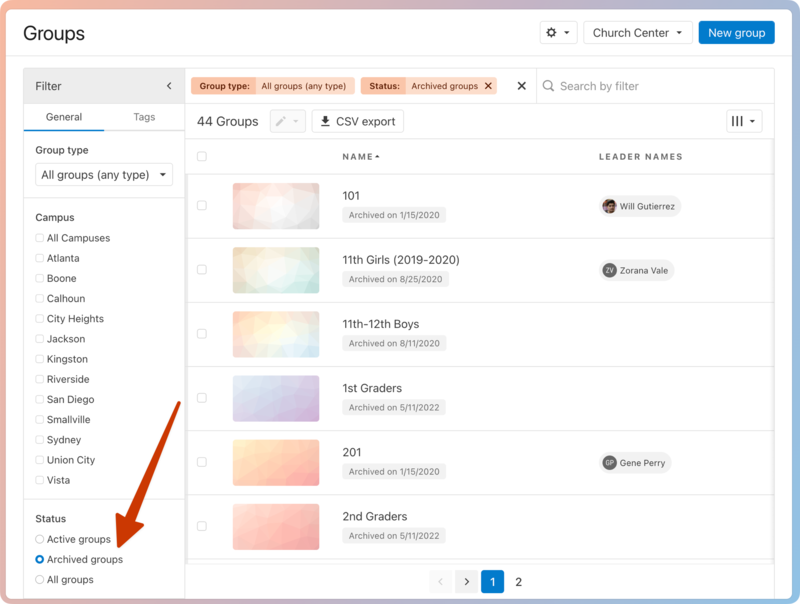
By default, the main Groups page shows only active groups. However, you can view archived groups by adjusting the filter settings.
Select the Groups page from the top navigation in Groups.
Select Filter in the top left to expand the filter menu.
In the Status section, choose Archived groups.
Restore an archived group
Select the Groups page from the top navigation in Groups.
Select Filter in the top left to expand the filter menu.
In the Status section, choose Archived groups.
Choose the archived group you want to restore.
From the top of the group page, select Un-archive group.
Read through the recommendation in the popup and select Un-archive.