Cover the fee
This feature is only available for United States organizations.
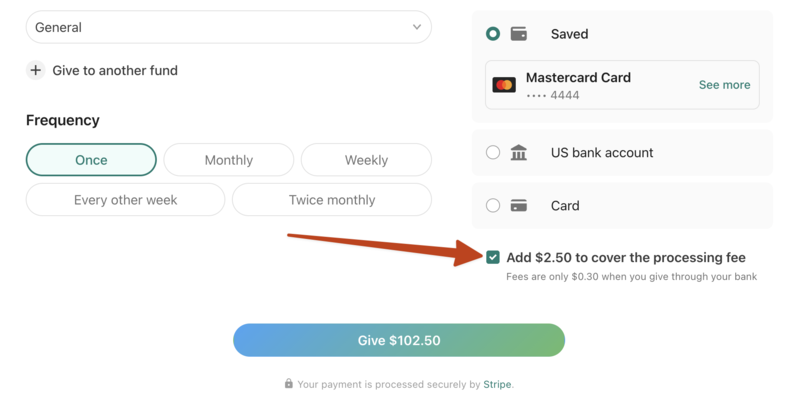
Customers in the United States can allow donors to cover the processing fees for their online donations. When enabled, donors can see the processing fee and choose to cover it by increasing the amount of their donation slightly.
Important
Cover the fee is available for online donations, but it is unavailable when using Text2Give, express giving, or donations manually processed by an administrator.
Should our church use this feature?
Enabling cover the fee saves your church money on fees, and the amount covered by the donor is usually small relative to the size of their donation.
Although this feature works for most churches, it may not work for yours if you receive many donations and pass them on to another organization.
Here's an example of why you might not want to enable cover the fee: If a donor wants to give $100 to a missions organization through the church and they cover the fee of 30¢ (ACH), their year-end tax statement will show that they gave $100.30 to that missions organization.
This means your church pays 30¢ of the total amount as a processing fee and receives $100 after fees. Your church has to either give the missions organization the $100 they received after fees (which won’t match the donor’s statement) or give $100.30 to the missions organization, requiring your church to reconcile the additional 30¢ after processing fees.
Enable cover the fee
You can enable cover the fee when managing your online donation form. From the Donation form tab on the Manage page, check the box next to Allow donors to cover the processing fees on the donation form.
How does it work?
A donation where the donor covers the fee means it’s a slightly more generous donation. So, the donation is not represented differently in your payout reports, and there’s no change in your bookkeeping process.
Though processing fees will still be charged to every online donation, the amount deposited to your church's bank account after fees will equal the amount the donor initially intended to give.
For example, if a donor decides to cover the fee and bump a $200 credit card donation to $204.70, the amount they’ll see in their receipt and donor statement is $204.70, and the church will receive $200. Stripe will receive the $4.70 fee.
In the formula below, the net is what actually ends up in the church's bank account. The gross is the transaction amount that's actually given by the donor. With the processing rates for US customers, the formula is as follows:
gross = (net + .3) / (1 - .0215)
So if a donor wants the church to net $200, we can now solve for gross by taking into account that the higher the gross amount is, the higher the fee will be:
gross = ($200 + .3) / .9785
gross = $204.70
So, when giving using a credit card, it takes a $204.70 donation for the church to receive $200 in their bank account.