Check in children with disabilities
Every child is unique and has their own way of learning, and not all children can fit inside the box of their age or grade. To help you ensure the children at your church are in the best classrooms for them, you can ignore the filters of locations.
If a child needs to go to a location outside of the pre-set location filters, check the box next to Ignore age and grade filters in the child's profile.
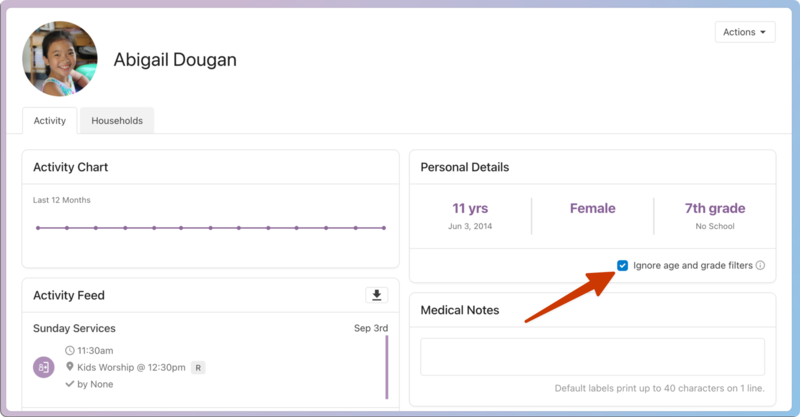
While this feature can be used for any person, the most common scenario for churches is helping children with disabilities. This checkbox allows children to check into any location, even if they don't fit the location filters. Once they've checked in, Check-Ins remembers their previous location in the event and will suggest that location the next time.
Create a location with special filters
If you have a classroom dedicated to supporting children with disabilities, you can create a location just for them.
Create a filter that no one will fit in, such as Ages 150 through 150 years, so only those who have checked the box to Ignore will have it as an option.
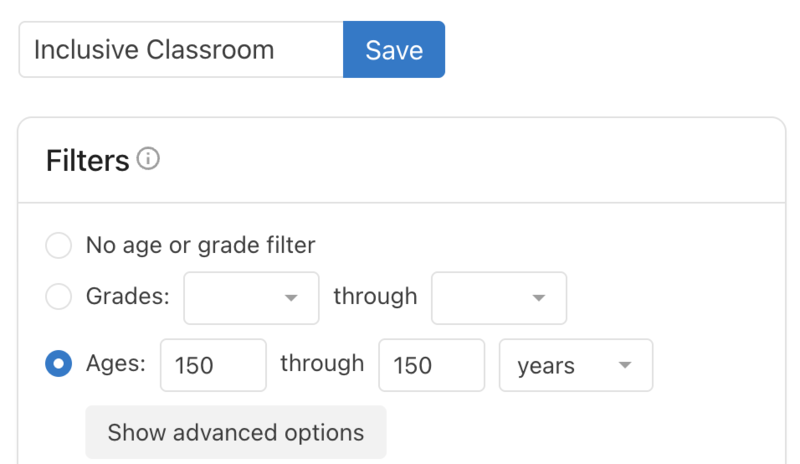
When a child checks in the first time, you'll have to manually choose this location. Then, when they check in the next time, Check-Ins will suggest the location the child checked into last. Any age or grade changes on their profile will not affect location suggestions, so if they need to change locations in the future, a volunteer can change that from a manned station.