View attendance reports
As a group leader, you want to stay on top of how your members engage with your group and identify who you may need to follow up with. Use your group's attendance report to see attendance trends and percentages over time and monitor your group's health!
Important
Attendance reports are available to group leaders for any group with at least one event where attendance was submitted.
Select your profile photo or initials at the top of the app.
Scroll down to the Activity and involvement section.
Select the group you want to view attendance reports for.
Select the Events tab.
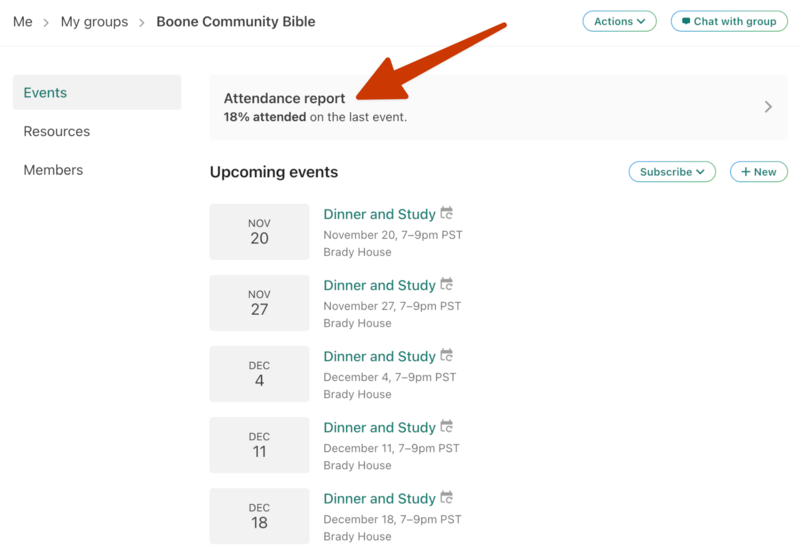
Select the attendance report banner at the top of the page.
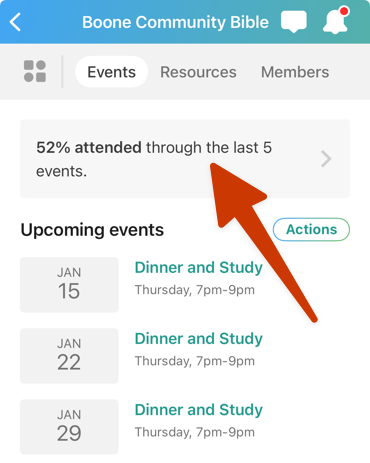
Select your profile photo or initials at the top of the page.
Scroll down to the Activity & involvement section.
Select the group you want to view attendance reports for.
Select the Attendance report banner at the top of the page.
The report shows the attendance percentage for each member next to their name. The dots beneath their names represent scheduled events.
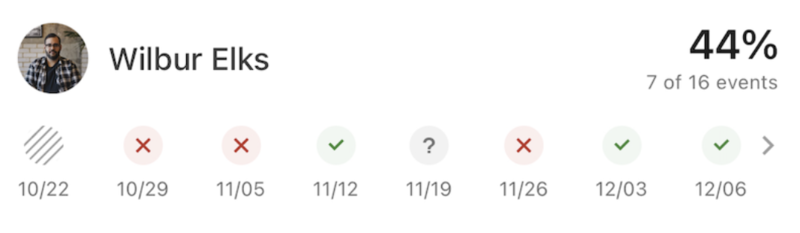
Green dot with a check mark: The event was attended.
Red dots with an X: The event was not attended.
Gray hashed-out dot: The event was canceled.
Gray dot with a question mark: Attendance was not submitted for the scheduled event.
Filter and sort the attendance report
By default, the attendance report displays members with the lowest attendance percentage first, as they're the ones you may want to follow up with.
Use the dropdowns at the top of the list to change the sort order and filter by different timeframes. (Adjusting the timeframe does not change the number of event dots on the report.)
Select a member's name to view their contact information and attendance history for the year.